Physical Address
304 North Cardinal St.
Dorchester Center, MA 02124
Physical Address
304 North Cardinal St.
Dorchester Center, MA 02124

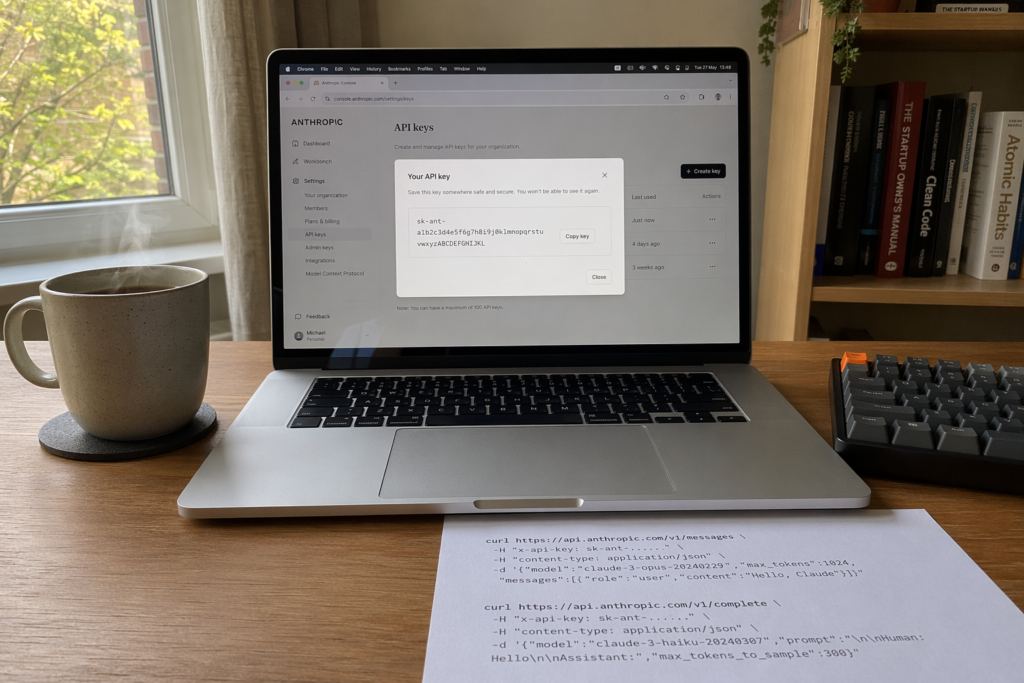
If you have just paid for Claude.ai Pro and assumed you could now hit api.anthropic.com with the same login, stop. You cannot. The Claude.ai chat product and the Anthropic API are two different products on two different billing systems, and your Pro subscription does not grant a single token of API quota. This is the most expensive misconception in the Anthropic ecosystem.
The good news: getting a real Anthropic API key takes about three minutes and is fully self-serve. The less good news: there are several quiet differences between Anthropic’s API and OpenAI’s that will silently break your first request if you copy from a tutorial written for the wrong provider.
This guide walks through every step, every gotcha, and every line of authentication code you need, with current June 2026 pricing and a security checklist for your team.
No. A Claude.ai Pro, Team, or Enterprise subscription does not include any Anthropic API access. The Claude.ai web app and the API are billed separately and managed through different portals. Your monthly Pro plan covers unlimited chat usage in the browser, but it grants zero API tokens.
The Claude.ai consumer product lives at claude.ai and is what most people picture when they hear “Claude”. The developer API lives at console.anthropic.com and is what your code talks to. They share the same underlying models but have entirely separate accounts, billing, and quotas. According to the Pickaxe community forum, where the thread “How do I get a Claude API key?” has attracted tens of thousands of views, this is the most frequently asked Claude question on the internet, full stop.
You must sign up at console.anthropic.com and configure a separate payment method before any API call succeeds. There is no migration path and no support route to transfer subscription value into API credit. If your organisation has already paid for Claude.ai Team seats, those seats remain useful for non-technical colleagues; engineering still needs its own Console workspace.
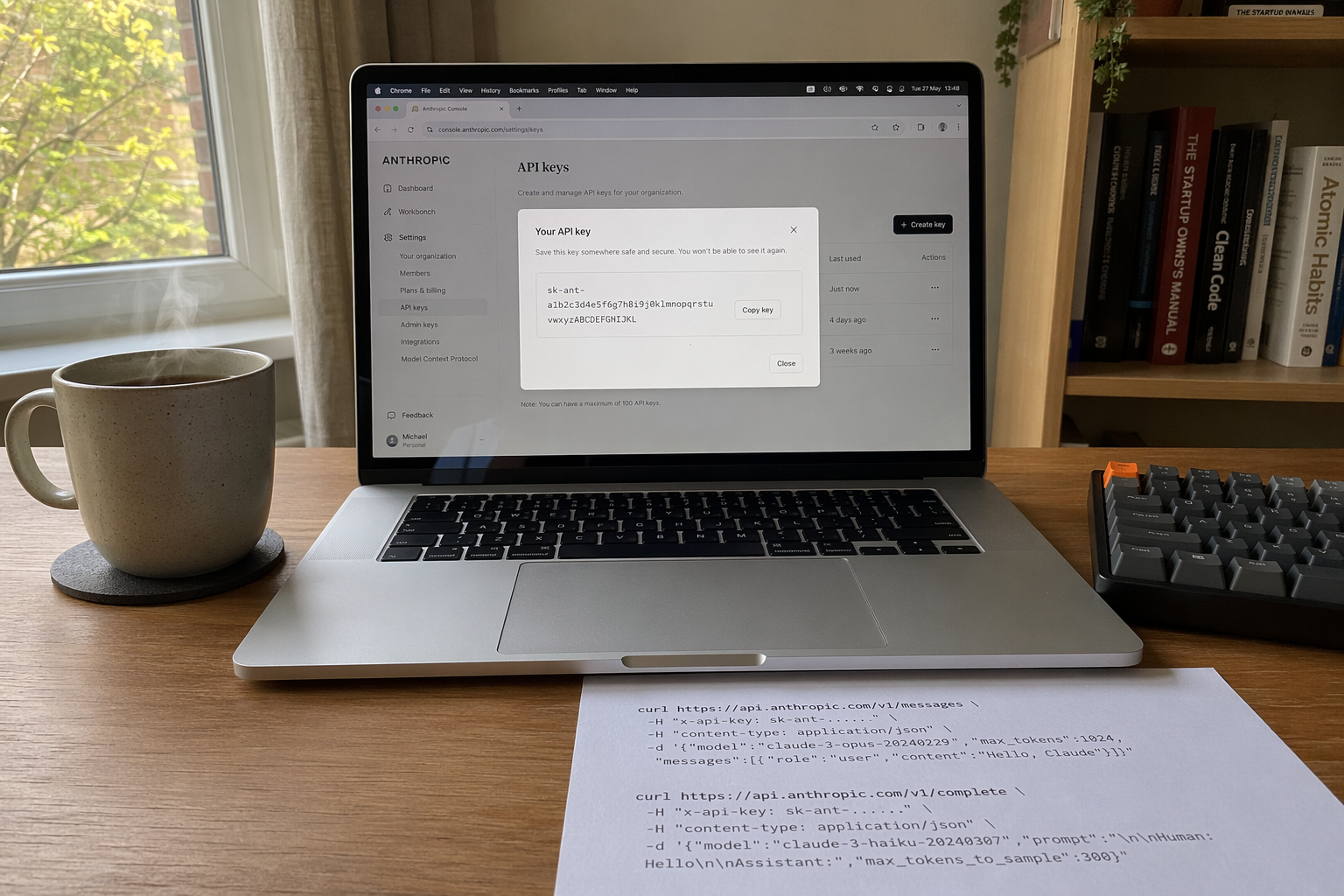
To get an Anthropic API key, visit console.anthropic.com, create an account, verify your email, navigate to Settings → API Keys, click Create Key, and copy the resulting sk-ant-... string before closing the dialog. The full process is self-serve and usually takes less than five minutes.
The exact sequence:
sk-ant-... value is displayed exactly once. If you close the dialog without copying, you must revoke the key and start again.Save the key into a password manager or, better, straight into your project’s .env file as ANTHROPIC_API_KEY=sk-ant-.... Never paste it into a chat, a screenshot, or a code comment.
As of June 2026, the Anthropic API charges $1 per million input tokens and $5 per million output tokens for Haiku 4.5, $3 / $15 for Sonnet 4.6, and $5 / $25 for the flagship Opus 4.8, according to Anthropic’s pricing page. Batch processing halves every price across the board, and prompt caching cuts cached-input reads by roughly 90%.
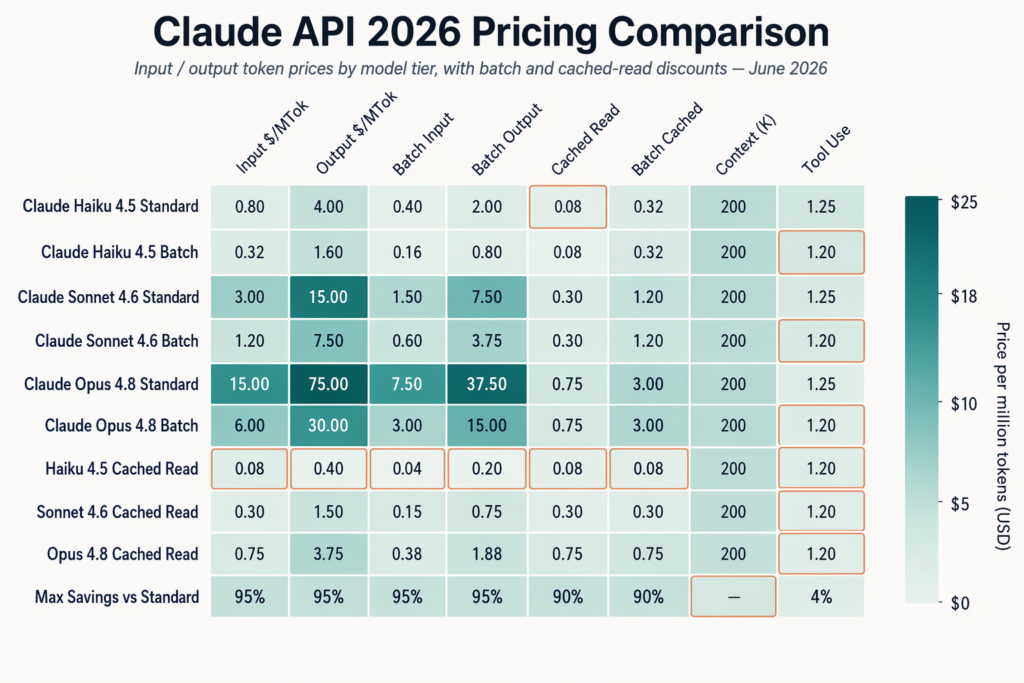
Translated for UK builders: a Haiku 4.5 call ingesting a 5,000-word email thread (~7,000 tokens) and generating a 200-word reply costs about $0.009. Run it 100,000 times a month and you are looking at roughly $900. Switch to Sonnet 4.6 and the bill triples; Opus 4.8 quintuples it. Model choice is the single biggest lever on your invoice.
Extra cost knobs:
Run a small pilot before scaling. A 10x overrun on month one is usually a misjudged model tier or a missing cache annotation.
Anthropic’s API uses a custom x-api-key request header, not the Authorization: Bearer pattern that OpenAI popularised. Every request must also include an anthropic-version header, otherwise the API returns a 400 Bad Request before your prompt is even parsed.
A minimal raw HTTP request looks like this:
POST https://api.anthropic.com/v1/messages
x-api-key: sk-ant-...
anthropic-version: 2023-06-01
content-type: application/json

{
  "model": "claude-sonnet-4-6",
  "max_tokens": 1024,
  "messages": [{"role": "user", "content": "Hello, Claude."}]
}
In Python, the official SDK reads the key automatically from the ANTHROPIC_API_KEY environment variable:
import anthropic

client = anthropic.Anthropic()  # picks up env var
reply = client.messages.create(
    model="claude-sonnet-4-6",
    max_tokens=1024,
    messages=[{"role": "user", "content": "Summarise the FCA's 2026 consumer duty review in one paragraph."}],
)
print(reply.content[0].text)
In Node.js with the @anthropic-ai/sdk package the pattern is identical:
import Anthropic from "@anthropic-ai/sdk";

const client = new Anthropic();
const reply = await client.messages.create({
  model: "claude-haiku-4-5",
  max_tokens: 512,
  messages: [{ role: "user", content: "Classify this support ticket." }],
});
console.log(reply.content[0].text);
The SDKs handle the version header, retries, and streaming for you. Use the official clients on GitHub rather than rolling your own HTTP wrapper.
The three most common breaking differences when porting code from OpenAI to Anthropic are the x-api-key header (not Authorization: Bearer), the mandatory anthropic-version header, and the fact that the Anthropic API has no system role inside the messages array. Each one fails silently or with a misleading error if you copy boilerplate from the wrong tutorial.
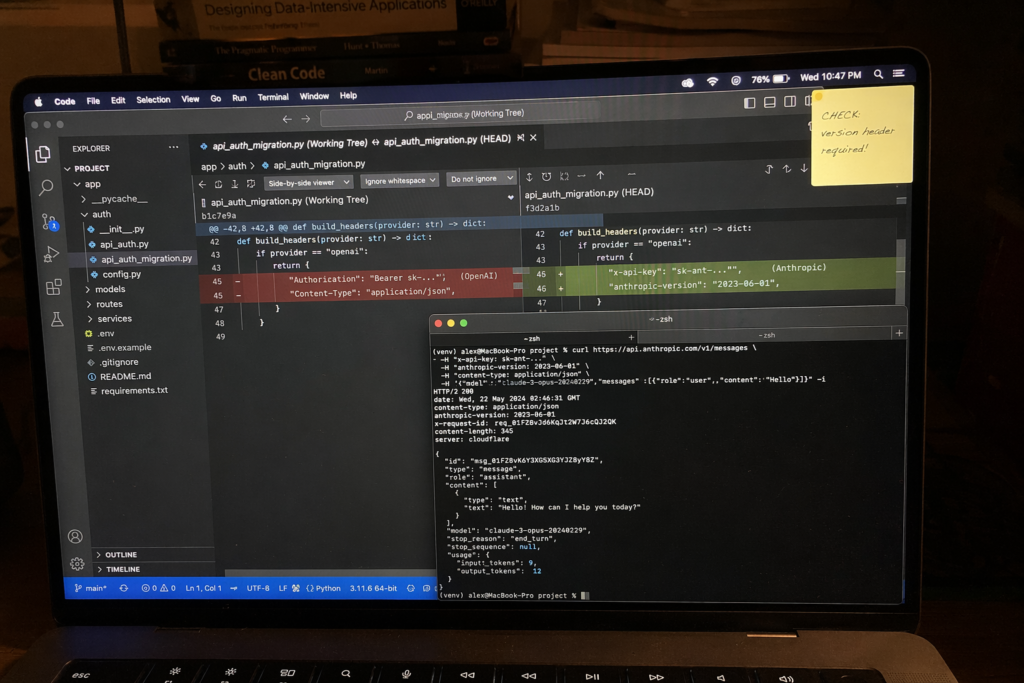
The full migration checklist:
Authorization: Bearer sk-... for x-api-key: sk-ant-.... Some HTTP libraries silently drop unknown headers if you have a global interceptor expecting Bearer auth; double check your client config.anthropic-version: 2023-06-01 (or the latest version date from the docs). Without it, every request returns 400.{"role": "system", ...} entry inside messages. In Anthropic’s Messages API it is a top-level system parameter on the request body. Putting it inside messages triggers a 400.max_tokens on every request; OpenAI’s max_completion_tokens field will be rejected.gpt- family to drop in. Use full Claude model identifiers like claude-opus-4-8, claude-sonnet-4-6, or claude-haiku-4-5.Before flipping any feature flag in production, run a full end-to-end test against the Anthropic API. Test suites that look identical between providers often hide subtle differences in tool use, JSON mode, and image input formats.
Treat an Anthropic API key like a database root password: never commit it to source control, never paste it into a browser dev console, and never embed it in client-side JavaScript or a mobile app binary. A leaked key is a direct line into your billing account, and bad actors run automated GitHub scrapers that can find a freshly committed key within minutes.
The non-negotiables:
process.env.ANTHROPIC_API_KEY or os.environ["ANTHROPIC_API_KEY"]. Use a .env file locally and a managed secret store in production (AWS Secrets Manager, Google Secret Manager, Azure Key Vault, HashiCorp Vault).read-only for monitoring; reserve full access for code that actually calls messages.create.If you do leak a key, revoke it immediately, rotate, audit usage logs, and check the Anthropic status page to rule out any platform incident.
Anthropic uses a usage-tier system. New accounts start on Tier 1, which applies conservative per-minute limits on requests, input tokens, and output tokens. As your cumulative spend and account age cross fixed thresholds, you automatically progress to Tier 2, 3, and 4. Each step unlocks higher requests-per-minute, larger token-per-minute budgets, and access to features like the Priority service tier.
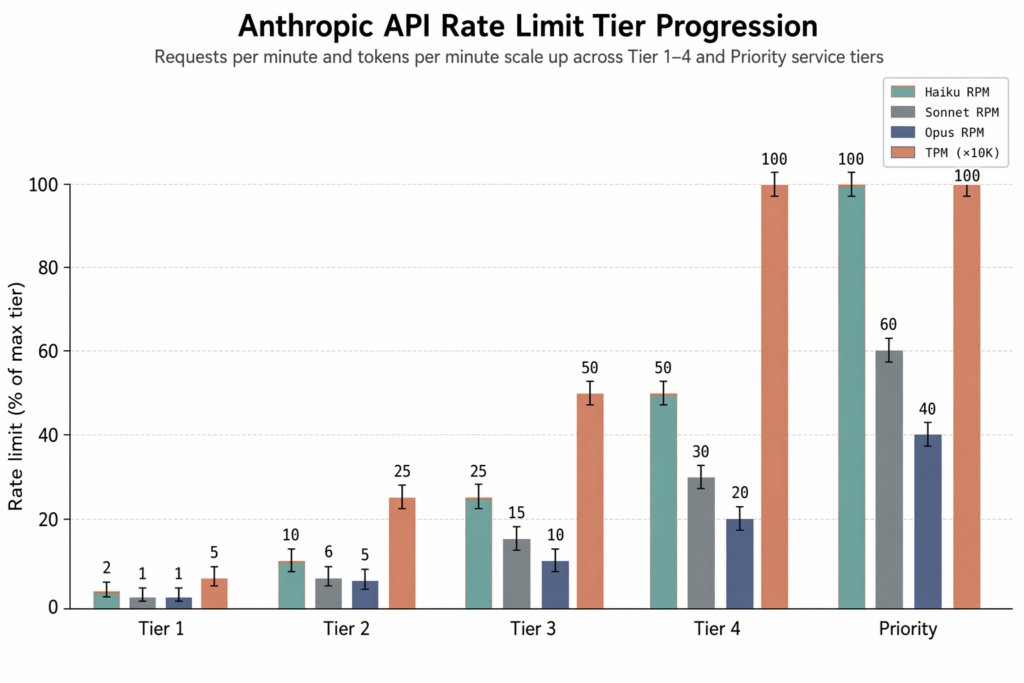
Practical implications:
Exceed a limit and the API returns a 429 Too Many Requests with a retry-after header. The official SDKs respect this automatically. If you hit 429s repeatedly, switch to the Batch API (half the cost as a bonus), cache repeated prompts, or contact support to request a tier bump.
The Anthropic Console ships with a built-in Workbench at console.anthropic.com/workbench that lets you compose prompts, switch models, adjust temperature and max tokens, and inspect responses interactively without writing a single line of SDK code. Use it as your first stop for any new prompt design, not your code editor.
A sensible Workbench-first workflow: open a new playground, drop in your system prompt, paste a representative user message. Run it on Haiku 4.5 first. If the cheapest model handles it well enough, you are done. Escalate to Sonnet 4.6 only if quality falls short, and reach for Opus 4.8 only when the task needs flagship reasoning. Iterate on wording, temperature, and stop sequences, then export the equivalent API call as Python, TypeScript, or curl directly from the interface.
This approach saves real money. Opus 4.8 costs five times more per output token than Haiku 4.5, so every prompt moved down the model ladder without quality loss pays for itself at scale.
For production, pair the Workbench with the Anthropic getting-started docs, which include side-by-side Python, TypeScript, and curl examples. Notion uses Claude for its in-app AI features; DuckDuckGo integrates Claude into its private chat product; Sourcegraph’s Cody assistant runs on Claude for in-editor code completions. All three teams started in the Workbench before writing a single line of integration code.
No. Generating an API key is free, but every API call consumes tokens billed at the pay-as-you-go rates listed on the Anthropic pricing page. Some new accounts receive a small one-time starter credit, but there is no ongoing free tier. If you want to use Claude without paying per call, the consumer Claude.ai product has a free chat tier with daily message limits.
In the Anthropic Console, go to Settings → API Keys, find the key you want to retire, and click Revoke. The key becomes permanently invalid the moment you confirm, and any service still using it will start failing immediately. Always create and deploy the replacement key first, then revoke the old one, to avoid downtime.
No, those platforms use their own authentication systems (IAM roles for Bedrock, service accounts for Vertex AI). If you want to call Claude via Bedrock or Vertex AI, you sign up with the cloud provider rather than Anthropic directly. Be aware that newer Claude features and model versions sometimes ship to the direct Anthropic API days or weeks before they appear on the cloud resellers.
You cannot retrieve a lost key. The full sk-ant-... value is displayed exactly once at creation and Anthropic does not store it on their side. Revoke the lost key in the Console (so it cannot be misused if it surfaces somewhere) and create a new one. This is deliberate security design, not an oversight.
Yes. Set the ANTHROPIC_API_KEY environment variable to your existing key before launching Claude Code, and it will use that key for authentication instead of prompting you to log in through the browser. This is the recommended pattern for CI/CD pipelines, headless servers, and shared developer machines where the interactive login flow is impractical.
This week, the AI industry moved beyond ambitious claims. OpenAI published machine-checkable proofs, model prices fell, autonomous agents…
Three teams released models above 900 billion parameters in a single week. The interesting question is not the…
GPT-5.6 solves a 50-year math problem. An AI agent raises $100 million. And Congress wants to know who…