Physical Address
304 North Cardinal St.
Dorchester Center, MA 02124
Physical Address
304 North Cardinal St.
Dorchester Center, MA 02124

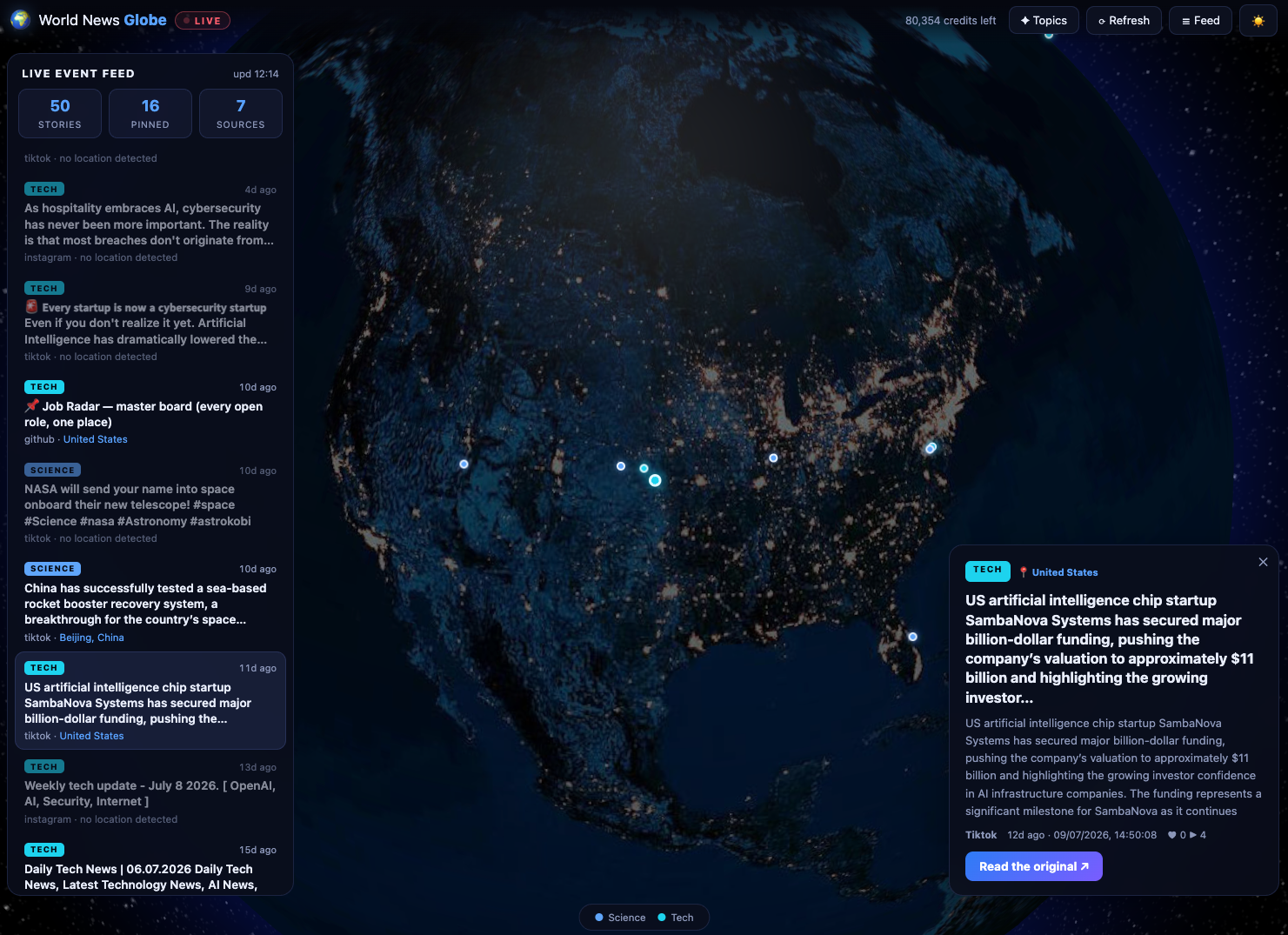
I came across WorldPulse 3D and wanted to build my own 3D world news map with Fable 5. I also wanted to test a narrower question: is Fable 5 actually good at 3D rendering?
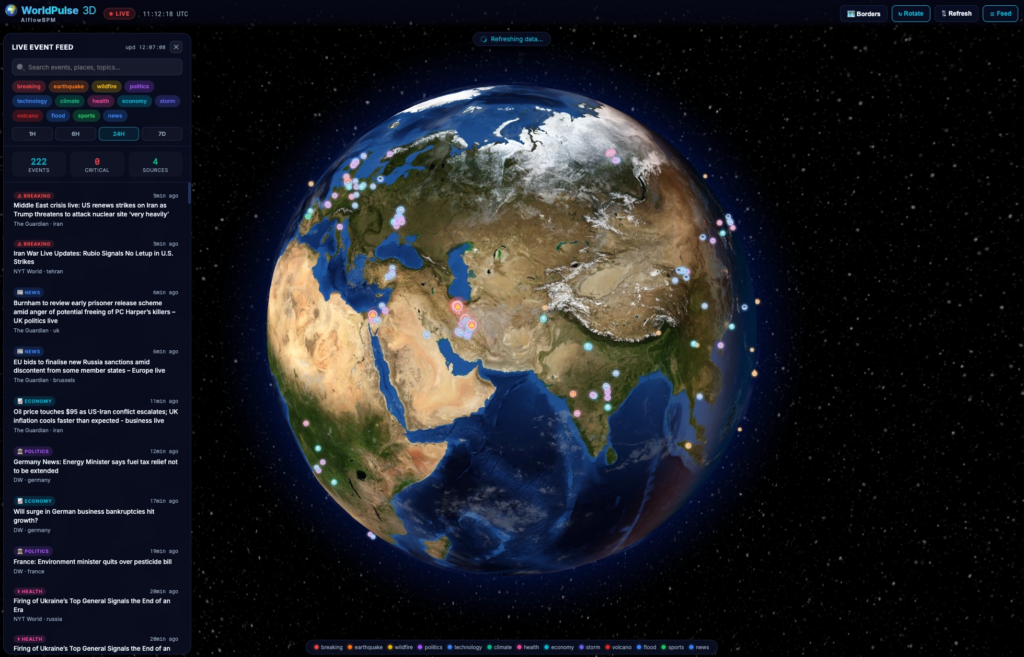
So I gave it one prompt. No starter code. No follow-up instructions. No iterations.
The short answer: Fable 5 produced a remarkably polished first pass. Although there were small errors in pinning the locations to some sources, the 3D design and functionality was near-complete.
Start with the user flow. Mine begins with a topic selector for subjects such as science, politics, climate and conflict. The app then collects the 50 most recent stories, places them on a globe, and lets the user rotate, zoom and click a pin to read more.
That gives the AI builder a testable product brief rather than “make me a cool globe.”
I used SocialCrawl as the data layer. One search fans the topic out across 12 sources and returns ranked, clustered results with freshness and engagement signals.
This is the real engineering problem. SocialCrawl returns text, not latitude and longitude. A globe can’t place “talks resume in Geneva” until the app turns Geneva into coordinates.
A robust pipeline should:
Don’t quietly assign random coordinates. An uncertain location should be marked or omitted.
Use a purpose-built globe library unless you need custom shaders or camera behaviour. Globe.GL, for example, provides globe textures, coordinate-based point layers and labels on top of Three.js and WebGL.
Then connect each pin to the news record behind it. Hover shows the headline. Click opens a detail panel. Topic controls the pin colour. Day and night textures provide the light and dark themes.
Build me a live world news globe. Working app, real data, one shot.

**What it does**

A user lands on a topic screen and picks one or more subjects — Health, Politics, Science,
Tech, Business, Sport, Climate, Conflict. They confirm, and the app pulls the 50 most recent
news items for those topics, live. Each item is pinned onto a 3D globe at the place in the
world it is about. The user spins the globe, finds a pin, clicks it, reads the summary, and
can open the original source.

**Data**

All news comes from the SocialCrawl API. Do not use a news API, do not scrape sites, do not
seed with sample data.

```
Base URL: https://www.socialcrawl.dev
Auth:     x-api-key: $SOCIALCRAWL_API_KEY   (header, every request)
Envelope: { success, platform, endpoint, data, credits_used, credits_remaining, request_id, cached }
```

Primary endpoint:

```
GET /v1/search/everywhere?query=<topic query>&lookback_days=2
```

It fans one query out across 12 sources (reddit, twitter-ai-search, youtube, tiktok,
instagram, hackernews, polymarket, github, threads, pinterest, perplexity, tavily) and
returns ranked, clustered candidates with engagement and freshness signals. It costs 20
credits per call. `sources`, `exclude`, `from_date` and `to_date` are also accepted. Sending
`Accept: text/event-stream` streams typed SSE chunks (`meta`, `source_started`, `items`,
`source_failed`, `ranked_final`, `clusters`, `done`) instead of returning one JSON body.

Narrower endpoints exist if you want them: `/v1/reddit/subreddit?subreddit=worldnews`,
`/v1/hackernews/search?query=`, `/v1/twitter/ai-search?query=`.

Error codes: `402 INSUFFICIENT_CREDITS`, `429 CONCURRENCY_LIMIT`, `503 SERVICE_UNAVAILABLE`
(`Retry-After: 30`, credits auto-refunded), `502 UPSTREAM_ERROR` (refunded).

**The location problem**

SocialCrawl does not return coordinates. There is no latitude, no longitude, and no location
field on any response. Every news item is text.

The globe still has to pin each item at the real place in the world that it concerns. Work
out how to do that. Your approach is up to you.

**The globe**

- A real-looking Earth. Continents, oceans, coastlines — recognisable as our planet, not an
  abstract sphere with dots.
- Fully interactive in 360°: click and drag to rotate freely in any direction, scroll to
  zoom. Momentum and easing on the spin.
- Pins sit on the surface at their location and stay anchored as the globe turns.
- Hovering a pin previews the headline. Clicking a pin expands a panel with the summary,
  source, platform, and time, plus a link that opens the original in a new tab.
- Pins are visually distinguished by topic.
- Light mode and dark mode, both properly designed. Dark mode is a night Earth; light mode is
  a day Earth. Toggling is instant and persists.

Use whatever visualisation library you think is right — globe.gl, Three.js, deck.gl,
CesiumJS, react-globe.gl, anything. Pick the one that gets the best result and say why.

**Stack**

Your call. It has to run locally with a documented start command.

**Deliver**

A running app and the commands to start it.Visually, the one-shot result was far better than I expected. It handled the ambiguity in the brief with strong product judgment and produced a polished output.
All the functions and features outlined in the prompt was functional.
I did not notice any errors or bugs, everything was working fine.
Also the design is as I exactly wanted it to be. The 3D rendering and interactive interface was impressive.
Fable 5 produced a rather near-complete app in one-go. It’s a great start and from here, I would start adding more features, such as take more news sources up to a couple of thousands.
Also here, Fable 5 was scraping sources from 3-4 years ago but I want more recent live news. Thus my next iteration would be to take sources only from last 48 hours.
But this was one prompt, one project and one run. Treat the output as an unusually strong prototype, not something to ship immediately.
👉 Grok 4.5 Coding Review: Fast, Cheap, but Lazy
👉 Claude Code Fable 5 vs Codex GPT-5.6 Sol: I made them build the same app
👉 Claude Code Tutorial for Beginners – Setup Guide
If you've ever tried to scrape TikTok data, you've probably hit the same wall. You search for a…
What People Really Think About Claude Opus 4.8 Claude Opus 4.8 dropped on May 28, 2026, and the…
How to find viral hooks for reels in your niche (using real TikTok data) If your reels aren't…