Physical Address
304 North Cardinal St.
Dorchester Center, MA 02124
Physical Address
304 North Cardinal St.
Dorchester Center, MA 02124

If you have been hearing about AI agents and wondering what they actually are, this guide is for you.
This beginner-friendly introduction explains what AI agents are, how they work, how they differ from normal chatbots, and how you can start using them for real tasks today.
I’ve been using agents to automate SEO content and to send me a summary of all the AI news from the last 24 hours every 9 a.m. via Slack message. It’s pretty amazing what these agents can accomplish.
⏱ 5 min read · Beginner · No coding required
AI agent definition: An AI agent is an AI system that can take a goal, break it into steps, use tools to execute those steps, and keep going until the task is complete, without a human guiding each move.
The key difference from a regular chatbot: a chatbot responds. An agent acts.
Ask ChatGPT how to send an email via Python: it tells you the code. An AI agent would write the code, run it, send the email, and confirm it was delivered. Same instruction. Completely different outcome.
This is what makes AI agents for beginners both exciting and worth understanding now, before they become the default way knowledge workers operate.
These three terms are often used interchangeably. They shouldn’t be. Each represents a fundamentally different level of capability.
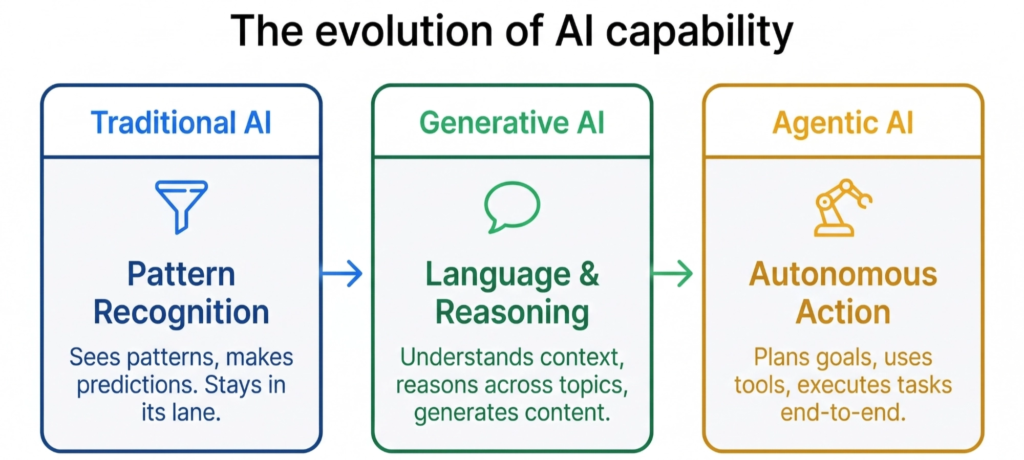
| Traditional AI | Generative AI | Agentic AI | |
|---|---|---|---|
| What it does | Predicts or classifies | Generates content, explains, reasons | Plans goals and executes tasks |
| Input | Structured data | Natural language | A goal or instruction |
| Output | A label, score, or decision | Text, code, images | A completed task |
| Flexibility | Narrow — one task | Broad — many topics | Dynamic — multi-step |
| Limitation | Can’t explain reasoning | Reactive and stateless | Requires guardrails and oversight |
| Example | Spam filter | ChatGPT answering a question | An agent that researches, writes, and sends a report |
The limitation of Generative AI is that it’s fundamentally reactive. You ask, it answers. The conversation ends and it forgets everything. AI agents break out of that constraint entirely.
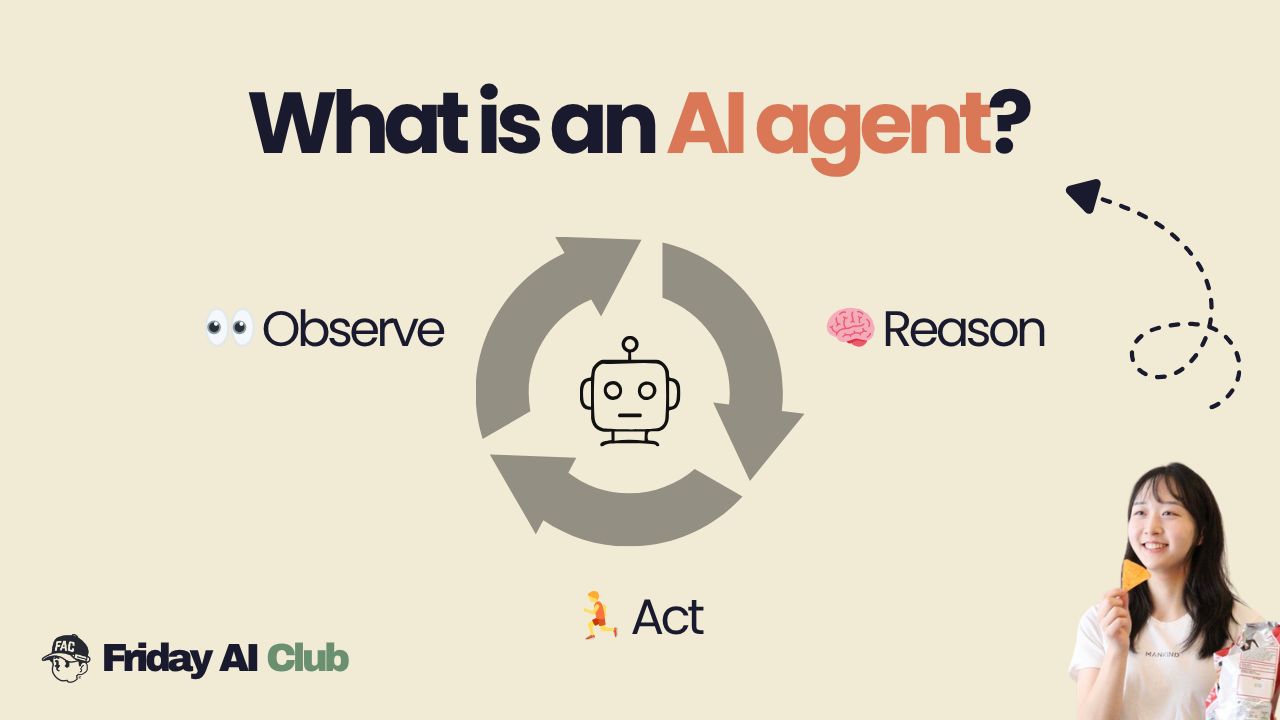
Every AI agent (regardless of framework or tool) runs on the same core loop. It’s called the ReAct loop (Reason + Act).
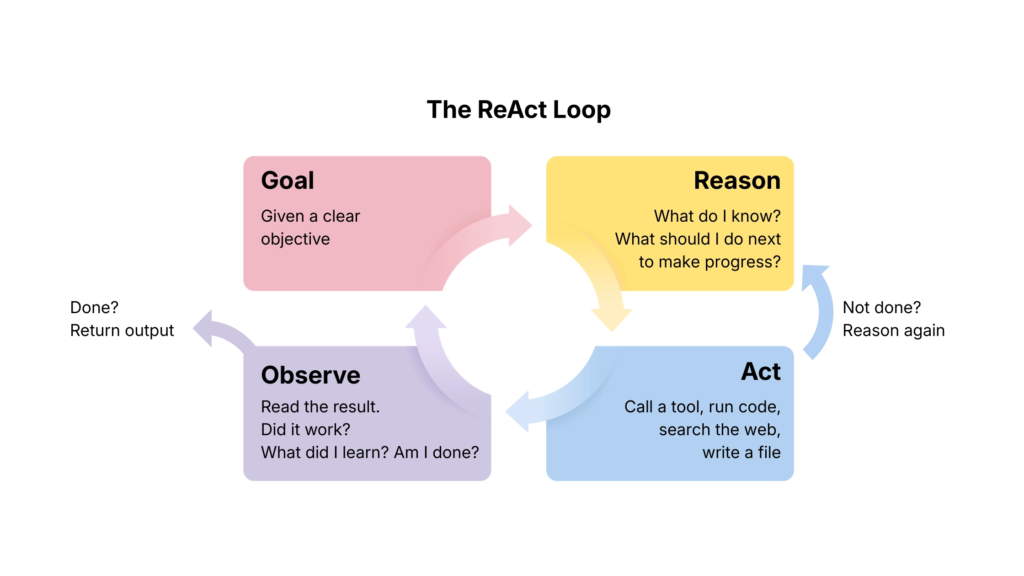
| Step | What the agent does | Real example |
|---|---|---|
| Goal | Receives a clear objective | “Research competitors and draft a summary report” |
| Reason | Decides the next best action | “I should start by searching for the top 3 competitors” |
| Act | Uses a tool to do something in the world | Runs a web search, reads results |
| Observe | Reads what happened | “I found 3 competitors. Now I need their pricing pages.” |
| Loop | Repeats until the goal is met | Fetches pages, extracts data, writes report |
| Output | Returns the finished result | Delivers the completed draft |
The loop repeats until the agent decides the goal is achieved, hits a stopping condition, or needs to ask a human for help. This is what separates AI agents for beginners to understand from simple prompt-response tools. The agent is genuinely working, not just responding.
No matter how complex an agentic system gets, it always comes down to four components.
| Building block | What it does | Real example |
|---|---|---|
| LLM (The Brain) | Reasons about the situation and decides the next step | Claude, GPT-4, Gemini |
| Tools (The Hands) | Functions the agent can call to interact with the world | Web search, file read/write, email, calendar, code execution |
| Memory (The Context) | Tracks what has been done, what was learned, and what the goal is | Conversation history, vector databases, saved notes |
| Goal (The Mission) | A clear objective — not a question | “Research X, write a report, and email it to the team by EOD” |
The goal is what separates an agent from a chatbot. A question has one answer. A goal requires the agent to judge when it’s actually done and keep going until it is.
AI agents for beginners often feel abstract until you see them applied to real work. Here’s how they map to specific roles.
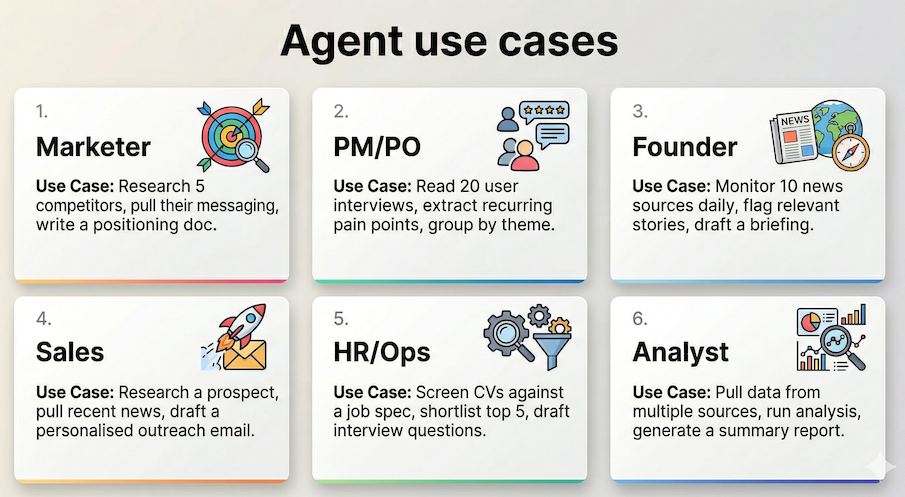
| Your role | The task | What the agent does | Outcome |
|---|---|---|---|
| Marketer | Competitor analysis | Searches, reads, extracts, synthesises | Positioning doc in 10 mins |
| PM / PO | User interview synthesis | Reads transcripts, groups themes, ranks issues | Pain point report, no manual notes |
| Founder | Daily news briefing | Monitors sources, filters relevance, drafts summary | Briefing in your inbox each morning |
| Sales | Outreach research | Pulls prospect info, writes personalised email | 1 email draft per lead, in seconds |
| HR / Ops | CV screening | Reads CVs, scores against spec, shortlists | Top 5 candidates flagged automatically |
| Analyst | Data reporting | Queries sources, analyses, formats output | Full report without manual data pulls |
Not every task needs an agent. Using one when a simple prompt would do adds unnecessary complexity and cost.
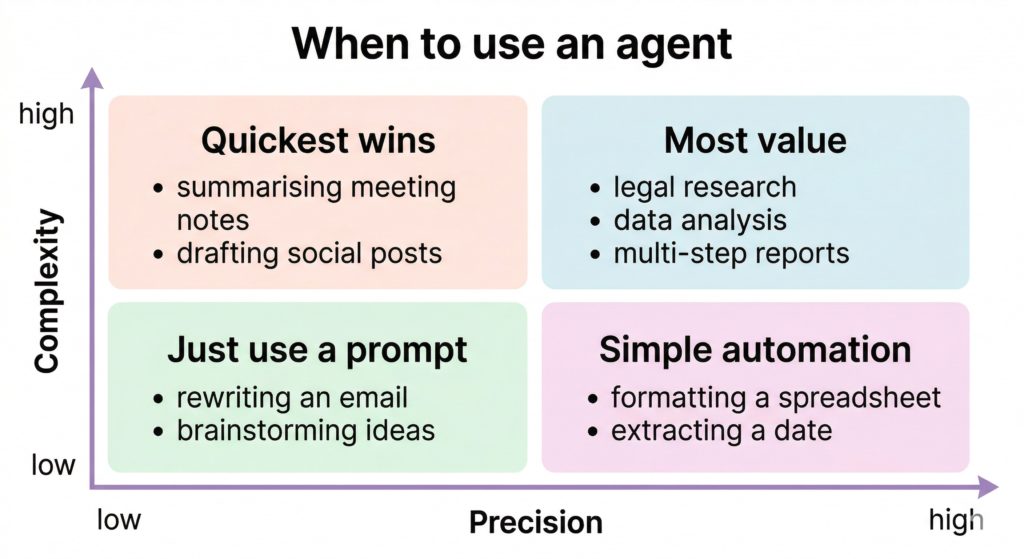
| Situation | Use a prompt | Use an agent |
|---|---|---|
| Task has a fixed, known sequence of steps | ✓ | |
| Output is a single piece of text or content | ✓ | |
| Task requires searching, reading, and synthesising multiple sources | ✓ | |
| You need to repeat the same multi-step process across many inputs | ✓ | |
| The task involves writing, then checking, then revising | ✓ | |
| You’d normally spend 2+ hours doing it manually | ✓ | |
| The task structure is genuinely unpredictable | ✓ | |
| You just need a quick answer or short draft | ✓ |
📌 A good rule of thumb: if you could write the steps on a Post-it note and they never change, use a prompt. If the steps depend on what you find along the way, use an agent.
You don’t need to write a single line of code to start experimenting with AI agents for beginners.
| Tool | What it is | Best for | Learn more |
|---|---|---|---|
| Claude (with web search on) | Conversational AI with browsing | Research tasks, drafting, synthesis | https://anthropic.skilljar.com/ |
| ChatGPT with Plugins | GPT-4 with tool integrations | General agentic workflows | https://openai.com/index/chatgpt-plugins/ |
| Zapier AI | No-code automation with AI steps | Connecting apps, automating email/data tasks | https://zapier.com/ai |
| Make (Integromat) | Visual workflow automation | Multi-step cross-app workflows | https://www.make.com/en |
| Claude Projects | Persistent context + custom instructions | Role-specific agents with memory | https://anthropic.skilljar.com/claude-101 |
| OpenClaw | AI agent platform | Using as a personal AI assistant | https://openclaw.ai/ |
Start with Claude or ChatGPT with web search enabled. Give it a task that would normally take you an hour such as competitive research, summarising a long document, drafting a report from raw notes. Watch how it breaks the task down and works through it. That’s your introduction to what ai agents for beginners need to actually experience to understand.
What’s the difference between ChatGPT and an AI agent? ChatGPT is a generative AI. It responds to your prompts in a single pass. An AI agent goes further: it takes a goal, plans multiple steps, uses tools like web search or file access, and keeps working until the task is complete. ChatGPT can behave like an agent when you enable tools and give it a multi-step goal.
Do I need to know how to code to use AI agents? No. Tools like Claude, ChatGPT, Zapier, and Make let you build and use agentic workflows without any coding. Code becomes useful if you want to build custom agents from scratch, but the majority of practical business use cases are accessible with no-code tools today.
What tools do AI agents use? Agents use functions called tools to interact with the world. Common tools include web search, file reading and writing, database queries, email and calendar access, code execution, and API calls to external services. The tools available depend on which platform or framework you’re using.
Is agentic AI safe? AI agents are as safe as the guardrails you put around them. Best practice is to start with read-only tools (search, summarise), require human approval for actions that can’t be undone (sending emails, making changes), and avoid giving agents access to sensitive systems until you trust the output quality. Like any powerful tool, the risk is proportional to the permissions you grant.
How is an AI agent different from a workflow automation like Zapier? Traditional automation follows a fixed script — if X happens, do Y. An AI agent decides what to do and in what order based on the situation. It can handle unexpected inputs, make judgment calls, and adapt its steps. Think of automation as a train on fixed rails; an agent is more like a driver who can reroute when the road changes.
👉 OpenClaw Setup Tutorial for Beginners
👉 Claude Code Tutorial for Beginners – Setup Guide
Published by Friday AI Club · Learn to operate the machine. Stay useful.
Most people still think about social media data in terms of posts, likes and follower counts. But a…
6 best Claude design skills for landing pages Ask an AI coding agent for a SaaS landing page…
Choosing the best AI coding model can feel like comparing four pages of benchmarks written in four different…