Physical Address
304 North Cardinal St.
Dorchester Center, MA 02124
Physical Address
304 North Cardinal St.
Dorchester Center, MA 02124

If your reels aren’t getting the reach you expected, the most likely reason is your hook. Not your posting time, not the hashtags, not the algorithm. Finding viral hooks for reels that actually work in your niche is the part most creators skip — and this guide shows you how to do it in two prompts, using real TikTok data instead of guesswork.
Most small accounts approach hooks the same way. They spend an hour scrolling TikTok, save 30 videos that feel like they’re working, and then try to write something that sounds similar.
That’s not a strategy. That’s a guess.
The problem is you’re pattern-matching by feel, not by data. You don’t know which videos in your niche are actually going viral. You don’t know the exact words those creators said in the first three seconds. And you don’t know whether it was an identity-based hook, a curiosity gap, or a problem-first opener that made someone stop scrolling.
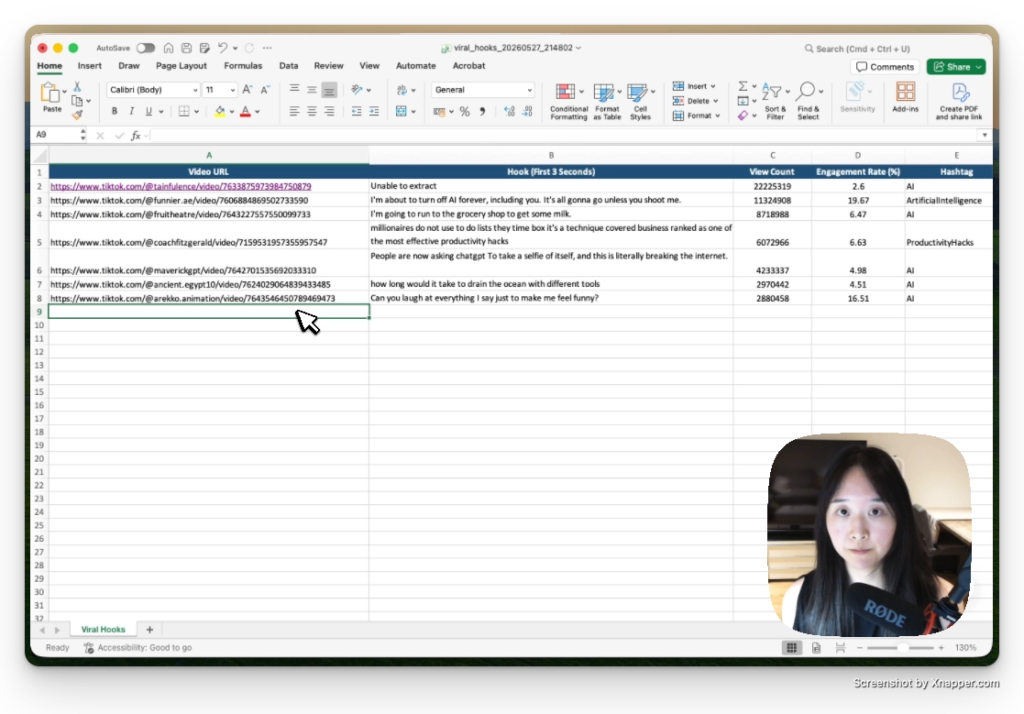
This workflow tells you all of that. You’ll end up with a spreadsheet of viral hooks for reels that are working in your exact niche, right now, built from real view counts and real transcripts.
The hooks this workflow pulls are spoken words — what the creator said out loud in the first three seconds. Visual hooks (text overlaid on screen, jump cuts, B-roll choices) aren’t available through the API.
That’s actually fine. The spoken hook is usually where the real work is. It’s what made someone stop mid-scroll before they even registered the visuals.
You don’t need to write any code. Claude Code handles the API calls for you.
Open Claude or Claude Code and paste this prompt. Fill in the three bracketed sections with your own details.
I run a [your niche] account on TikTok and Instagram Reels.

My target audience is [describe them — e.g. small business owners,
new parents, fitness beginners, women over 40].

The kind of content I make is [e.g. quick tips, tutorials,
before/after, day-in-the-life, product reviews].

Based on my niche, give me:

1. A list of 10 hashtags where the most viral content in my niche
   is already getting millions of views

2. 5 keyword search terms I should use to find the top-performing
   reels in my niche

3. What hook style tends to perform best in this niche —
   identity-based (speaking directly to who they are),
   curiosity gap (teasing a reveal), or problem-first
   (calling out the pain point they already feel)
Claude will come back with a hashtag list, keyword terms, and a recommendation on hook style for your niche. Copy the hashtag list. You’ll paste it directly into step two.
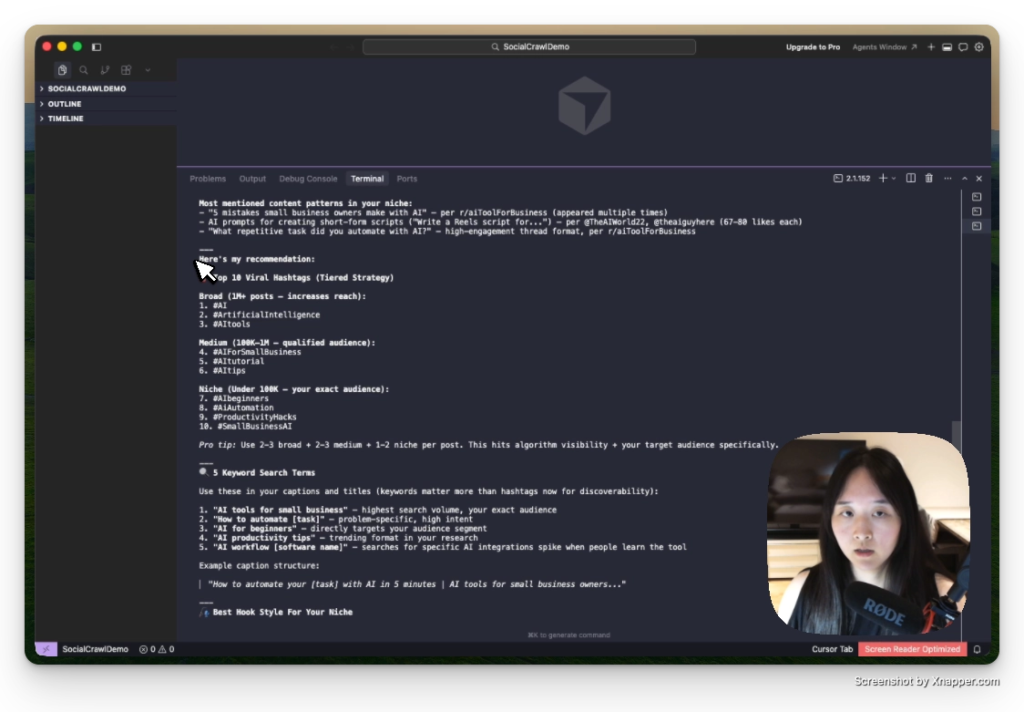
Open Claude Code and paste this prompt. Add your hashtag list from step one and your SocialCrawl API key where indicated.
Using the SocialCrawl API, I want to find viral hooks for reels
in my niche and save them to an Excel file.

Here are my top hashtags: [paste the list from Step 1]

Do this step by step:

Step 1 — Search TikTok using the endpoint /v1/tiktok/search/hashtag
for each hashtag. Pull the top 20 videos per hashtag.

Step 2 — Filter the results. Keep only videos with:
  - More than 500,000 views, OR
  - An engagement rate above 5%

Step 3 — For each video that passes the filter, pull the full
transcript using /v1/tiktok/post/transcript.

Note: transcripts cost 10 credits each, so only pull them for the
top 10 videos max to keep costs low.

Step 4 — From each transcript, extract the spoken words from the
first 3 seconds. That's the hook.

Step 5 — Save everything to an Excel file with these columns:
  - Video URL
  - Hook (first 3 seconds of spoken audio)
  - View count
  - Engagement rate
  - Hashtag it came from
Claude Code works through your hashtags one by one, filters out anything below the view threshold, pulls transcripts for the top videos, and extracts the first three seconds from each one.
You’re not copying anyone’s content. You’re reading what’s already working and writing your own version of it. That’s how every good writer has always worked.
The difference is you’re doing it from data, not from an hour of aimless scrolling.
👉 Claude Design Tutorial: Build A Social Media Dashboard
👉 How to Give Claude Code Social Media data
👉 Claude Code Tutorial for Beginners – Setup Guide
I came across WorldPulse 3D and wanted to build my own 3D world news map with Fable 5.…
If you've ever tried to scrape TikTok data, you've probably hit the same wall. You search for a…
What People Really Think About Claude Opus 4.8 Claude Opus 4.8 dropped on May 28, 2026, and the…