Physical Address
304 North Cardinal St.
Dorchester Center, MA 02124
Physical Address
304 North Cardinal St.
Dorchester Center, MA 02124

If you have spent any time near AI engineering this year, you have probably heard developers swap stories about agents that book flights, triage support tickets, write code, and chase down research questions while their human goes for a coffee. Most of those stories now run on the OpenAI Agents SDK, the framework OpenAI shipped in March 2025 to replace its experimental Swarm project and the older Assistants API.
This guide covers what the SDK is, how it works, and how you can build with it without drowning in jargon. It is written for developers and tech-savvy founders who are new to agents but comfortable reading a few lines of Python. By the end, you should be able to install the SDK, ship a working agent, and have an honest view of where it sits next to LangChain, CrewAI, and AutoGen.
The OpenAI Agents SDK is an open-source framework, available in Python and TypeScript, that lets you build AI agents. Agents are programs that decide what to do, call tools, and keep going until a task is finished, rather than returning a single text response. According to the OpenAI announcement, the SDK shipped on 11 March 2025 alongside the new Responses API and built-in tools for web search, file search, and computer use.
OpenAI describes the SDK as the production-ready successor to Swarm, an educational multi-agent project from 2024 that the company explicitly told people not to deploy. The Swarm repository on GitHub still exists, but development moved into the Agents SDK. OpenAI has also said it plans to formally deprecate the older Assistants API, with a target sunset in mid-2026 once feature parity with the Responses API is complete.
The launch matters because it is the first time OpenAI has offered a serious, opinionated, code-first orchestration layer of its own. Before March 2025 most teams reached for LangChain, CrewAI, or wrote bespoke loops. The Agents SDK is OpenAI’s answer to “what should the canonical way to build an agent on our platform look like”.
The whole framework is built around four primitives, documented on the OpenAI Agents SDK site. Organise your understanding around these and you can ignore almost everything else.
Two more features round it out. Sessions automatically keep conversation history across runs, so you do not have to thread messages manually. Sandbox Agents, introduced in version 0.14.0, let an agent operate inside an isolated container with a filesystem, run shell commands, edit code, and maintain workspace state across long tasks.
Under the hood the SDK leans on several open-source dependencies. Pydantic handles schema validation for tool inputs and outputs, the MCP Python SDK provides Model Context Protocol support, and LiteLLM is the optional bridge that lets you swap in non-OpenAI models. None of this is hidden; the GitHub README acknowledges these projects directly.
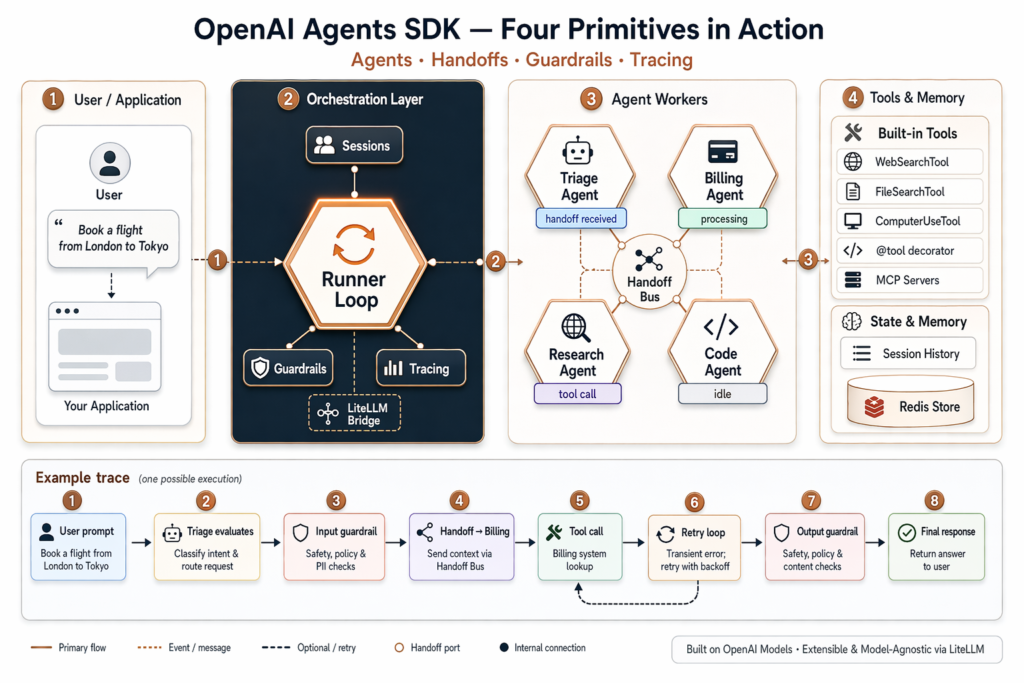
Getting a first agent running is quick. The Python SDK requires Python 3.10 or newer and is installed with one command:
pip install openai-agents
Set your API key as an environment variable:
export OPENAI_API_KEY="sk-..."
Then a working agent is fewer than ten lines of code:
from agents import Agent, Runner

agent = Agent(
    name="Concierge",
    instructions="You are a polite UK concierge. Answer in two short sentences."
)

result = Runner.run_sync(agent, "Recommend a Sunday roast in central London.")
print(result.final_output)
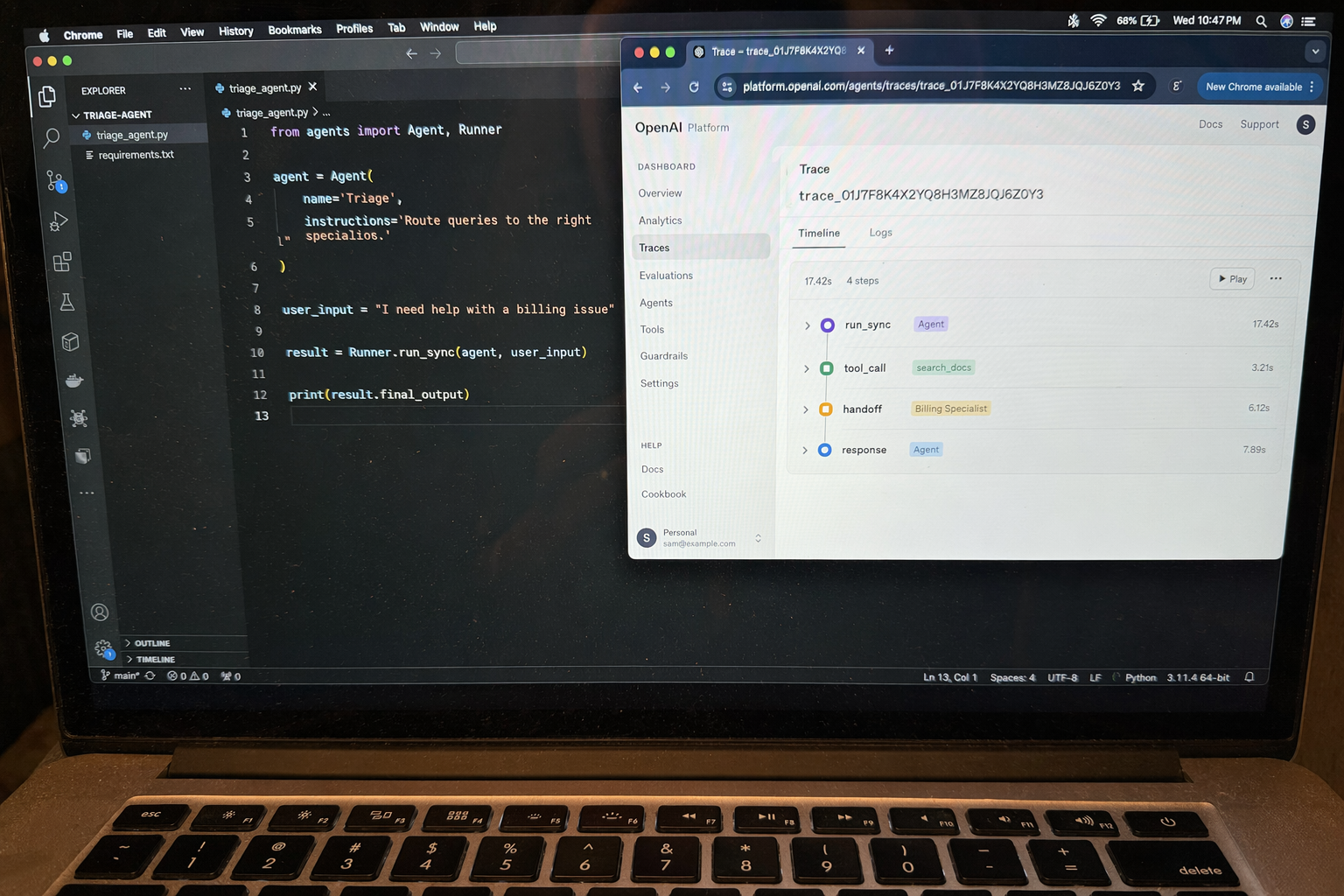
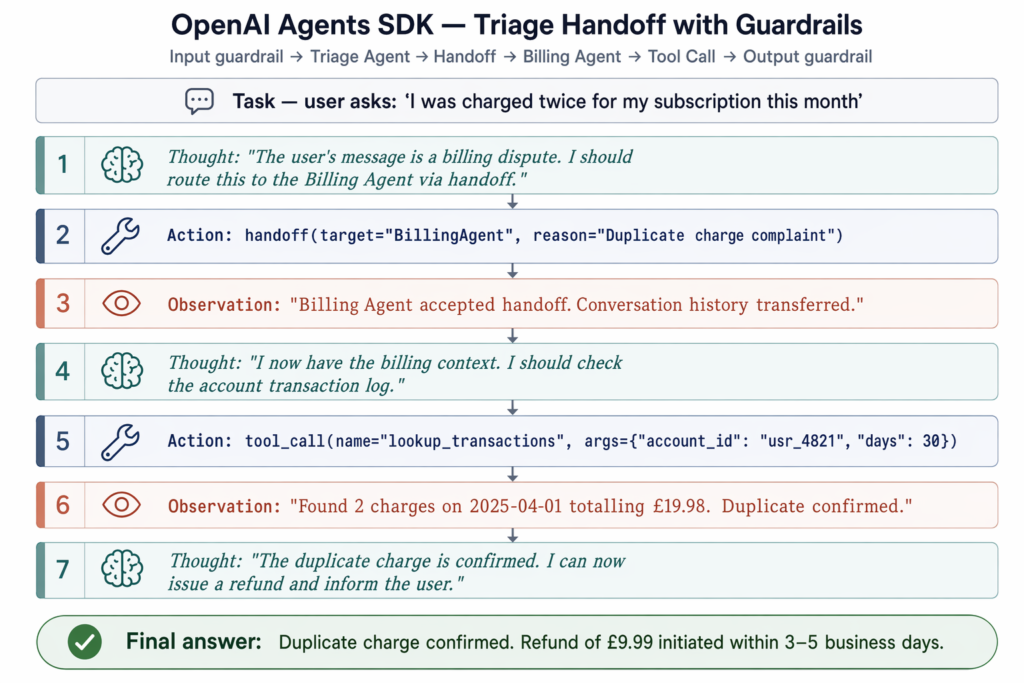
That is the entire “hello world”. To organise multiple agents, you add a second agent and connect it with a handoff:
from agents import Agent, Runner

billing = Agent(name="Billing", instructions="Answer billing questions.")
triage = Agent(
    name="Triage",
    instructions="Route the user to the right specialist.",
    handoffs=[billing],
)

result = Runner.run_sync(triage, "I was charged twice this month.")
print(result.final_output)
You can find optional install groups for richer features: pip install openai-agents[voice] adds realtime and voice agent support, and pip install openai-agents[redis] adds Redis-backed session persistence. A parallel TypeScript and JavaScript SDK lives at openai/openai-agents-js for Node and frontend use cases.
The SDK is general purpose, but seven patterns come up again and again in the documentation, GitHub examples, and community write-ups.
WebSearchTool and ask it to find, summarise, and cite sources. Useful for market research, competitor analysis, or literature reviews.@tool functions and attach them to an agent.Beginners are usually steered towards the triage pattern as a first project because it demonstrates agents, tools, handoffs, and tracing in around twenty lines. London-based AI consultancy Faculty Science, which works on data science pipelines for public sector clients, has adopted a similar multi-agent triage structure to route document queries across departments, illustrating how the pattern scales beyond toy examples.
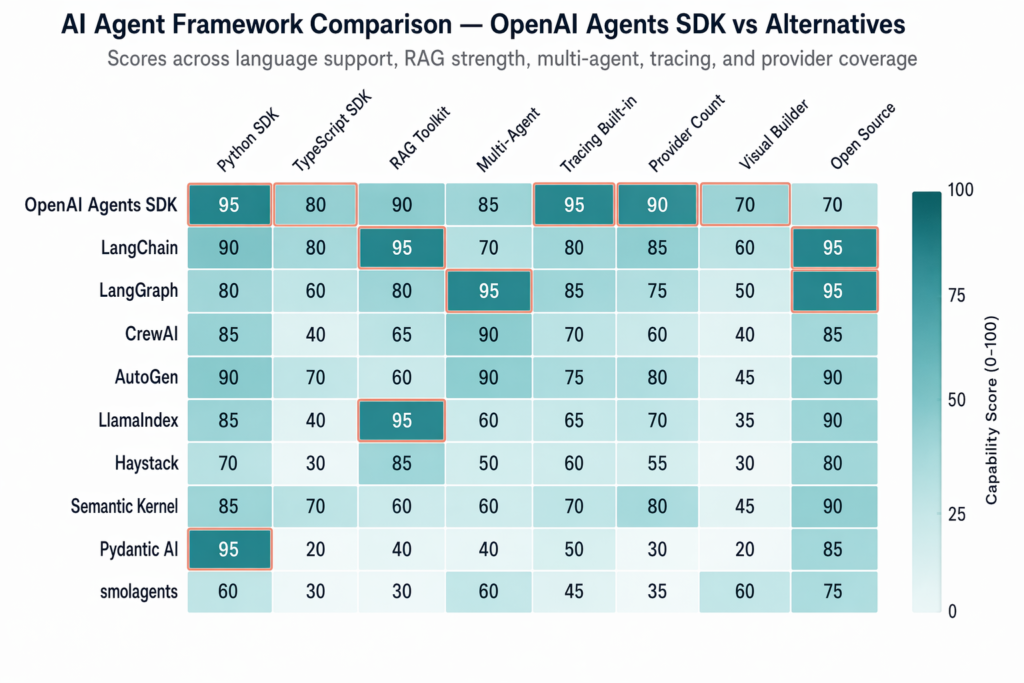
This is the question every team asks once they have built a hello world. The honest answer is that the SDKs overlap heavily, and the best choice depends on what you already use.
LangChain and LangGraph remain the broadest open-source ecosystem. LangChain 1.0 and LangGraph 1.0 reached stable in October 2025, marking the maturation of the competing framework stack. LangChain integrates natively with around 50 LLM providers and has the strongest retrieval-augmented-generation toolkit in the open-source world. LangGraph, its sibling project, is built around stateful graphs and is the better fit when your workflow has complex branching, retries, or long-running state. The Agents SDK supports more than 100 LLMs through LiteLLM, but its native integrations are smaller.
CrewAI uses a “crew of roles” metaphor where each agent has a job title and the framework choreographs collaboration. It is LLM-agnostic and popular for structured team-based automation. If you like thinking in terms of roles (“the researcher”, “the writer”, “the reviewer”), CrewAI is intuitive.
AutoGen from Microsoft focuses on conversational multi-agent setups, with a drag-and-drop interface in AutoGen Studio for non-coders. It pairs naturally with Azure OpenAI deployments.
For a beginner with an OpenAI API key and a Python environment, the Agents SDK is the fastest on-ramp. Code is minimal, tracing is built in, and the integration with the Responses API and OpenAI’s native tools (web search, file search, computer use) is unmatched. According to a Developers Digest comparison, teams already invested in LangChain’s RAG stack often stay there, while greenfield projects on OpenAI lean towards the Agents SDK.
OpenAI also expanded the ecosystem at DevDay 2025 with AgentKit, a production-grade visual workflow toolkit that sits on top of the Agents SDK. That removes one of LangChain’s historical advantages, which was tooling around design and observability.
Despite the name, no. This is the most common misconception about the SDK. The README on the openai/openai-agents-python repository states clearly that it supports the OpenAI Responses and Chat Completions APIs alongside more than 100 other LLMs. The Python repository has accumulated roughly 25,300 GitHub stars since launch (as of May 2026), and the JavaScript counterpart sits at around 2,700 stars, according to GitHub.
In practice you can route requests through Anthropic Claude, Google Gemini, Mistral, or local models served by Ollama, all via LiteLLM. The orchestration logic, handoffs, guardrails, and tracing remain the same; only the model client changes. That makes the SDK a reasonable choice even for teams who do not want to be locked in to OpenAI for inference, although you will lose access to OpenAI-specific built-in tools when you swap providers.
The SDK itself is free and open source under a permissive licence. There is no orchestration fee on top. You pay only for the underlying model and tool calls at OpenAI’s standard published rates, the same as you would for any direct API request, according to the OpenAI announcement post. What drives the bill is volume: agents make multiple LLM calls per task because they reason, plan, call tools, and reflect on results. Set sensible max_turns limits on your runner and watch the tracing dashboard for runs with unusually high token counts. The keyword data tells its own story; “openai agents sdk” attracts about 5,400 monthly searches with a cost-per-click of $20.42, placing it firmly in the top tier of developer-tool keywords.
Beyond cost, a few honest caveats are worth keeping in mind.
The SDK is not a no-code tool. AgentKit and Agent Builder sit on top of the SDK for visual workflows, but the SDK itself is code-first and assumes you are comfortable in Python or TypeScript.
It does not solve hallucinations on its own. Guardrails help validate inputs and outputs, and tracing helps you spot mistakes after the fact, but you still need grounded data, careful prompts, and evaluation pipelines. Tools like Langfuse and AgentOps integrate with the SDK to add structured evaluation.
It is not a wrapper around Assistants. Conversation memory now lives in the Sessions feature rather than the Assistants API’s hosted threads, and OpenAI has been clear that Assistants is on a deprecation path. It is also not experimental: Sandbox Agents, guardrails, and tracing were designed for production from day one, although you should still pin your dependency version.
Finally, multi-agent systems are not always the right answer. A single well-prompted agent with a small toolset is often cheaper, faster, and easier to debug than a constellation of specialists. Reach for handoffs when you have distinct domains of expertise, not just to feel sophisticated. If you want to build something this weekend, start with the triage pattern, add the WebSearchTool, and watch the trace dashboard while it runs.
The Agents SDK is a code-first Python and TypeScript framework for building multi-agent workflows where your application owns orchestration, tool execution, and state. The Assistants API was a hosted service that managed those concerns server-side. OpenAI has stated that Assistants is being deprecated, with a target sunset in mid-2026, in favour of the Responses API and the Agents SDK.
Run pip install openai-agents on Python 3.10 or newer, set your OPENAI_API_KEY environment variable, define an Agent with a name and instructions, then call Runner.run_sync(agent, "your prompt"). A working agent takes fewer than ten lines of code and runs against any OpenAI chat-capable model by default.
No. The SDK is provider-agnostic and supports more than 100 LLMs through LiteLLM, including Anthropic Claude, Google Gemini, Mistral, and local models. Only the model client changes; the agents, handoffs, guardrails, and tracing primitives stay the same regardless of the provider you choose.
The Agents SDK is minimalist, Python-first, and optimised for rapid deployment inside the OpenAI ecosystem. LangChain is more modular, supports about 50 providers natively, and has a stronger built-in retrieval-augmented-generation toolkit. Beginners with an OpenAI key generally find the Agents SDK quicker to start, while LangChain offers more flexibility for complex pipelines.
The SDK itself is free and open source. You pay only for the underlying API calls at OpenAI’s standard token and tool-use rates, with no separate charge for the orchestration layer. Costs scale with the number of LLM calls an agent makes per task, so set sensible turn limits and use tracing to spot expensive prompts.
This week, the AI industry moved beyond ambitious claims. OpenAI published machine-checkable proofs, model prices fell, autonomous agents…
Three teams released models above 900 billion parameters in a single week. The interesting question is not the…
GPT-5.6 solves a 50-year math problem. An AI agent raises $100 million. And Congress wants to know who…