Physical Address
304 North Cardinal St.
Dorchester Center, MA 02124
Physical Address
304 North Cardinal St.
Dorchester Center, MA 02124

Here’s what “AI agent loop” actually means and why it can cost $1.3 million a month. More importantly, here is the specific version that works today.
If you spend any time around software developers or AI tech circles right now, you’ve probably noticed a major shift in the conversation. Over a single weekend, a new coding meta dropped and went completely viral. AI industry figures like Peter Steinberger and Boris Cherny set off a massive wave of discussion about something called an “AI agent loop.”
Peter Steinberger’s tweet on the topic racked up over 5 million views in less than 24 hours. The message was simple: stop writing individual prompts for your AI coding assistants and start designing loops instead.
But what does that actually mean when you strip away the hype?
To understand a loop, look at how an autonomous system processes a task without you standing over its shoulder.
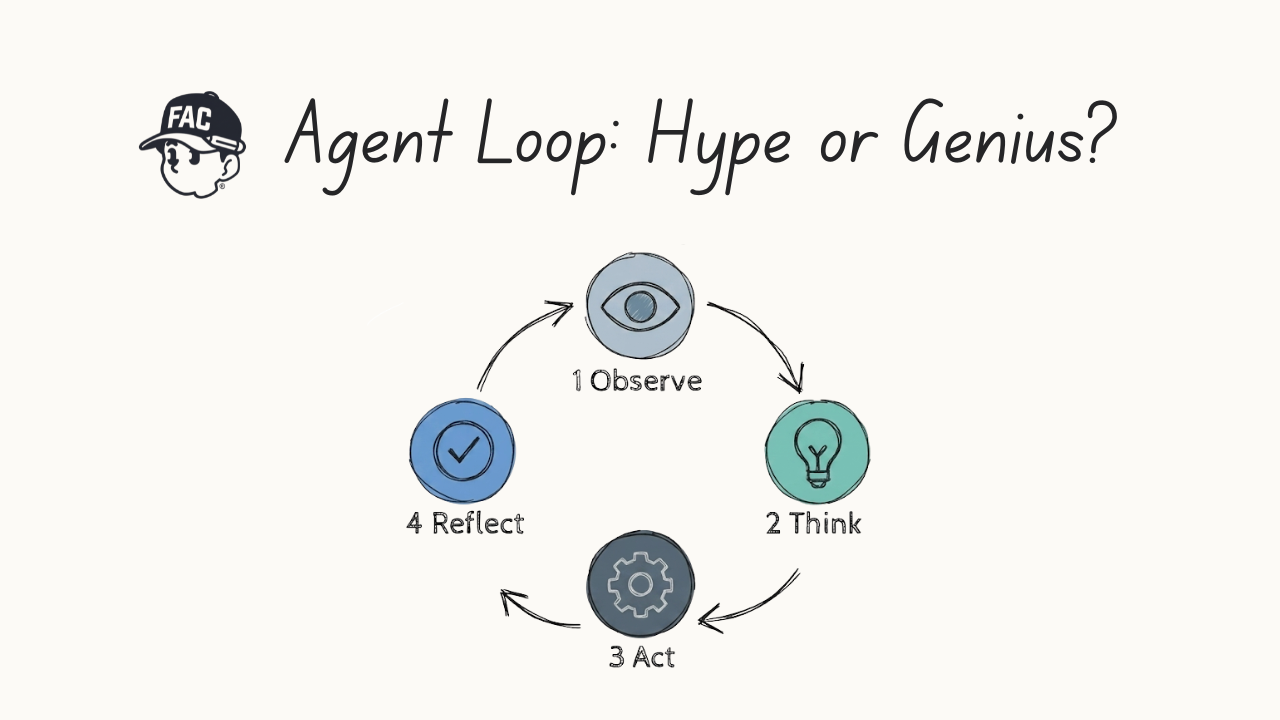
Instead of treating the AI like a basic calculator where you type a question and get a single answer, a loop turns the AI into a recurring system. It operates through specific stages shown in the architecture diagram:
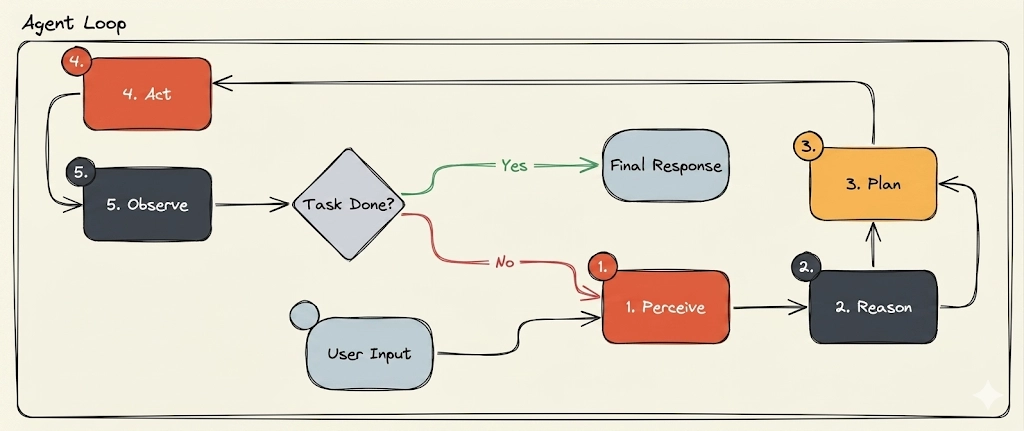
spec.md or a product requirements document (prd.md).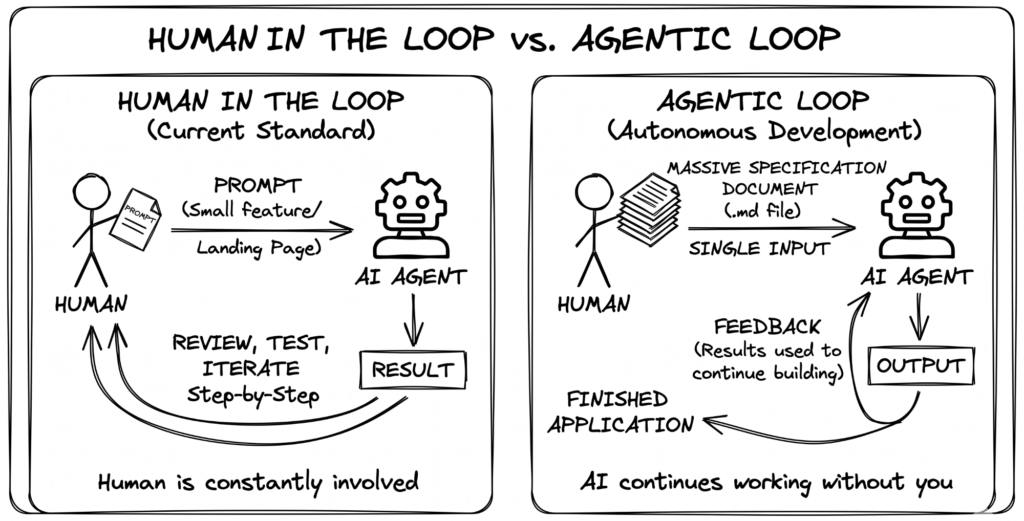
Most everyday builders currently operate in a “human in the loop” model. You open a tool like Cursor or Claude, type a prompt to build a landing page, check the code, and then type another prompt to add a feature. The human is the engine driving every step.
A loop removes you from the middle of that process. Commands like /loop in Cloud Code or automation triggers in your development workspace allow you to set an open-ended goal and walk away.
It is also vital to distinguish a loop from standard automation. Basic automation executes a rigid, predetermined sequence of prompts. It doesn’t care if the code works or fails; it just runs the scripts. A true loop contains internal decision-making. It actively evaluates its own progress and decides what to do next based on whether it hit your verifiable goal.
This sounds like the ultimate shortcut to building software, but there is a massive catch. Looping is incredibly expensive.
When you remove the human from the loop, you remove the brake pedal. The agent will prompt itself hundreds of times in a row, rewriting code and making design assumptions to fix its own bugs. If you leave a loop running on an abstract goal, it will burn through a standard $20 or $100 monthly AI subscription in minutes.
To put this in perspective, Peter Steinberger revealed that his autonomous looping experiments racked up a staggering $1.3 million in monthly token usage.
Right now, this technology is a playground for the top 1% of engineers who work at places like OpenAI or Anthropic. They can run these systems because they have infinite token budgets. For anyone else, running unchecked loops is an easy way to get a catastrophic bill.
You can use this interactive calculator to see how fast costs escalate when an AI agent runs autonomously without human intervention.
| Timeframe | Token Consumption | USD Cost |
|---|---|---|
| Hourly | 0 | $0.00 |
| Daily | 0 | $0.00 |
| Weekly | 0 | $0.00 |
| Monthly | 0 | $0.00 |
| Yearly | 0 | $0.00 |
Does this mean loops are pure hype? Not quite. They work exceptionally well in confined, closed-off engineering tasks where the feedback is binary.
The perfect use case right now is automated code review.
When you push code to a platform like GitHub, tools like Code Rabbit or Gravile can trigger a highly effective loop. Instead of inventing a product from scratch, the agent has a narrow task: look at the pull request, catch bugs, and fix security flaws.
Here is how a practical code review loop looks in action:
gp loop triggers.This works because the goal is deterministic. The tests either pass or they fail. However, even this tight system has hard limits. The moment you feed a loop more than 1,000 lines of code at once, the context window gets crowded, the agent loses track of the details, and the loop usually breaks.
If you’re building a startup, a micro-SaaS, or a personal app, you don’t need to design massive autonomous loops today.
Building a successful product requires human intuition and adjustments. When you use tools like /goal or sloop to build an entire app from scratch, the AI has to make thousands of microscopic architectural choices. Because it can’t read your mind, it will almost always make the wrong assumptions. You will end up with a messy codebase and a giant token bill.
AI can replicate existing structures, but it can’t invent the unique value that makes your product special. For now, keeping yourself firmly in the loop is the most productive, cost-effective way to build. Save the autonomous loops for narrow tasks like automated testing and code reviews.
👉 Claude Design Tutorial: Build A Social Media Dashboard
👉 How to Give Claude Code Social Media data
👉 Claude Code Tutorial for Beginners – Setup Guide
Most people still think about social media data in terms of posts, likes and follower counts. But a…
6 best Claude design skills for landing pages Ask an AI coding agent for a SaaS landing page…
Choosing the best AI coding model can feel like comparing four pages of benchmarks written in four different…