Physical Address
304 North Cardinal St.
Dorchester Center, MA 02124
Physical Address
304 North Cardinal St.
Dorchester Center, MA 02124


Most TikTok Shop product research is manual, slow, and based on gut feel. You scroll, screenshot, guess. This post shows a different approach: an automated 6-step pipeline that pulls data from TikTok Shop across three regions, filters by the criteria that actually predict winners, and outputs a ranked CSV of your top 30 opportunities — all triggered from a single prompt to Claude Code.
We built this for the pet/dog category, but the logic applies to any niche.
Before writing a single line of code, it helps to understand what signals experienced TikTok Shop dropshippers actually look for. The criteria break down into four categories:
Price point. The impulse-buy sweet spot on TikTok Shop is $15–$80. Below $15, margins are too thin. Above $80, purchase hesitation spikes. This single filter removes roughly 35% of products from any initial search.
Quality signals. A minimum 4.0-star rating is non-negotiable — anything below correlates with high return rates. But review count matters too. Fewer than 30 reviews means the product is unproven. More than 2,000 reviews often means the market is already saturated with resellers.
Review sentiment. Raw star ratings hide the real picture. Review text tells you whether buyers are genuinely delighted (“obsessed, bought three”) or quietly disappointed (“doesn’t match the photo”). The difference matters enormously for ad creative and return rates.
Shop authority. A viral product from a shop with fewer than 10 total listings is a fulfilment risk. Established shops with high total sales are safer to source from and less likely to disappear.
Here’s how the full pipeline works, from first API call to exportable CSV.
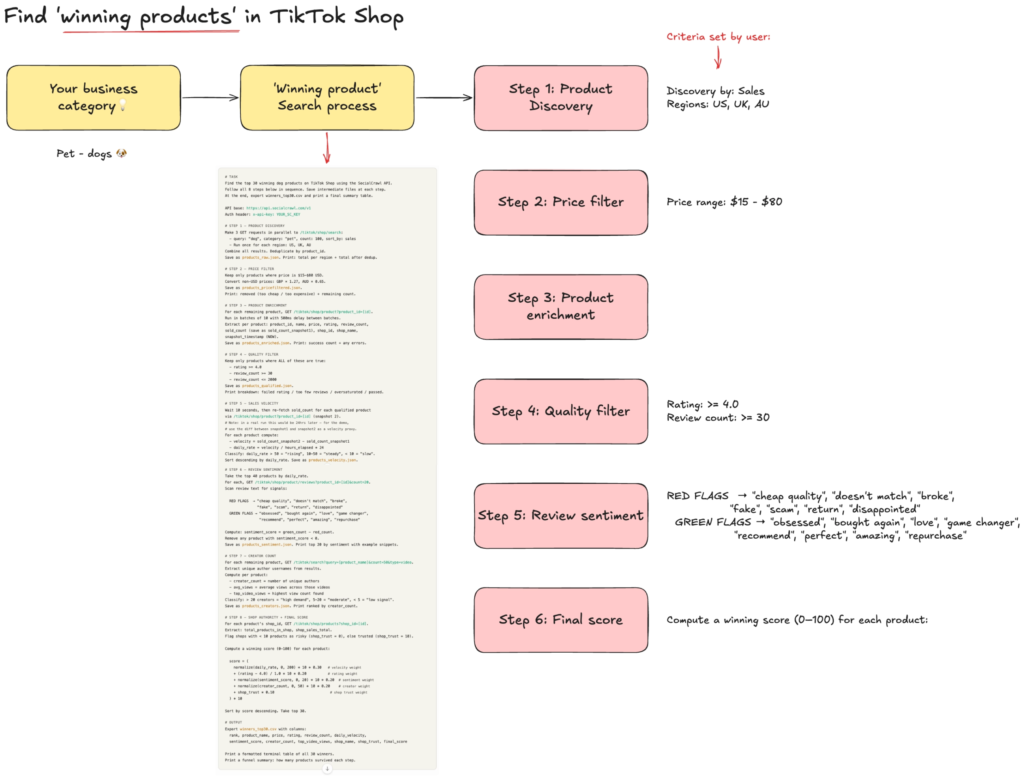
The first call hits tiktok/shop/search three times in parallel — once each for US, UK, and Australia — with sort_by: sales and count: 100. After deduplication, this typically returns around 200 unique products in the dog/pet category.
The reason for three regions is margin. UK and AU markets are often less saturated than US for the same product, and GBP and AUD pricing can convert better for UK and AU-based operations.
A simple in-memory filter keeps only products in the $15–$80 range, converting GBP and AUD to USD equivalents before applying the threshold. This typically removes around 35% of the raw universe.
For each product that survives the price filter, the pipeline calls tiktok/shop/product to fetch full details: rating, review_count, sold_count (recorded as snapshot 1 with a timestamp), shop_id, and shop_name. These run in batches of 10 with a 500ms delay to keep the request pattern clean.
Three conditions must all be true to pass: rating ≥ 4.0, review_count ≥ 30, review_count ≤ 2,000. This typically reduces the list from around 139 to roughly 80 products. The products removed here aren’t bad products — they’re just unsuitable for this particular entry strategy.
For the top 40 products by velocity, the pipeline fetches 20 recent reviews each via tiktok/shop/product/reviews. It scans review text for pre-defined green flags (“obsessed”, “bought again”, “game changer”) and red flags (“cheap quality”, “broke”, “doesn’t match photo”). The sentiment score is simply green count minus red count. Any product with a negative score is removed.
The last step pulls shop-level data for each product’s shop_id via tiktok/shop/products to check shop authority, then computes a weighted score across all five dimensions: velocity (30%), rating (20%), sentiment (20%), creator count (20%), and shop trust (10%). The top 30 products by score are exported as a CSV.
The full funnel typically looks like this: 218 raw products → 139 after price filter → 80 after quality filter → 53 after velocity → 37 after sentiment → top 30 scored and ranked.
Copy and paste the prompt below to get started.
Replace the [red bolded placeholders] to your specific search criteria.
Find the top [30] winning dog products on TikTok Shop using the SocialCrawl API. Follow all 6 steps below in sequence. Save intermediate files at each step. At the end, export [winners_top30.csv] and print a final summary table.*


**Step 1 — Product discovery.** Make 3 GET requests in parallel to `/tiktok/shop/search`: query: "[dog]", category: "[pet]", count: 100, sort_by: sales. Run once for each region: [US, UK, AU]. Combine all results. Deduplicate by product_id. Save as products_raw.json.

**Step 2 — Price filter.** Keep only products where price is [$15–$80 USD]. Convert non-USD: GBP × 1.27, AUD × 0.65. Save as products_pricefiltered.json.

**Step 3 — Product enrichment.** For each remaining product, GET `/tiktok/shop/product?product_id=[id]`. Run in batches of 10 with 500ms delay. Extract: product_id, name, price, rating, review_count, sold_count (snapshot 1), shop_id, shop_name, snapshot_timestamp. Save as products_enriched.json.

**Step 4 — Quality filter.** Keep only: [rating ≥ 4.0], [review_count ≥ 30], [review_count ≤ 2000]. Save as products_qualified.json.

**Step 5 — Review sentiment.** For top 40 by daily_rate, GET `/tiktok/shop/product/reviews?product_id=[id]&count=20`. Scan for red flags (["cheap quality", "doesn't match", "broke", "fake", "scam", "return", "disappointed"]) and green flags (["obsessed", "bought again", "love", "game changer", "recommend", "perfect", "amazing", "repurchase"]). sentiment_score = green_count − red_count. Remove products with score < 0. Save as products_sentiment.json.

**Step 6 — Shop authority and final score.** For each product's shop_id, GET `/tiktok/shop/products?shop_id=[id]`. Flag shops with <10 products as risky (shop_trust = 0), else trusted (shop_trust = 10). Compute score = (normalize(daily_rate) × 10 × 0.30) + ((rating − 4.0) / 1.0 × 10 × 0.20) + (normalize(sentiment_score) × 10 × 0.20) + (normalize(creator_count) × 10 × 0.20) + (shop_trust × 0.10) × 10. Sort by score descending. Take top 30. Export winners_top30.csv with columns: rank, product_name, price, rating, review_count, daily_velocity, sentiment_score, creator_count, top_video_views, shop_name, shop_trust, final_score. Print a formatted terminal table and funnel summary.The pipeline uses five TikTok Shop endpoints from the SocialCrawl API:
tiktok/shop/search — product search by keyword, category, and regiontiktok/shop/product — full product details including rating, review count, and sold counttiktok/shop/product/reviews — review text for sentiment analysistiktok/shop/products — shop-level product listings for authority scoringtiktok/search — general TikTok video search for creator count analysisSocialCrawl normalises all of these into a consistent response schema, which means Claude Code doesn’t need any platform-specific parsing logic — the same field names appear regardless of which endpoint you hit. Total credit cost for a full run of this pipeline is roughly 400–500 credits.
Once you have your winners_top30.csv, the next steps depend on your business model:
For affiliates, navigate to the link to the product and study the top-performing videos for those products before filming your own. Reverse-engineer the hook style, the demonstration format, and the CTA mechanic.
For dropshippers, the shop_trust column and shop_name tell you who to contact for sourcing. Established shops with high total sales are your first call.
For AI builders, this pipeline is a template. Swap “dog” for any category, change the region parameters, adjust the scoring weights. The same SocialCrawl endpoints work for any of the 22 platforms, and the unified schema means your integration code doesn’t change when you expand to Instagram shopping or Pinterest product pins.
👉 Claude Design Tutorial: Build A Social Media Dashboard
👉 How to Give Claude Code Social Media data
👉 Claude Code Tutorial for Beginners – Setup Guide
I came across WorldPulse 3D and wanted to build my own 3D world news map with Fable 5.…
If you've ever tried to scrape TikTok data, you've probably hit the same wall. You search for a…
What People Really Think About Claude Opus 4.8 Claude Opus 4.8 dropped on May 28, 2026, and the…