Physical Address
304 North Cardinal St.
Dorchester Center, MA 02124
Physical Address
304 North Cardinal St.
Dorchester Center, MA 02124

Claude Skills let you save repeatable instructions and workflows so Claude can follow them consistently across tasks.
In this guide, you’ll learn what Claude Skills are, why they matter, and how to set up Claude Skills step by step in just a few minutes.
What you’ll learn:
Who this is for:
A skill is a set of instructions that teaches Claude how to handle specific tasks or workflows. It’s a perfect way to customise Claude for your specific needs, such as writing in your brand tone and manner or designing specific UI that matches your company’s brand book.
Instead of re-explaining your preferences, processes, or specific needs in every conversation, skill allows you to teach Claude just once and Claude will instantly learn how to use that skill and apply it in every conversation.
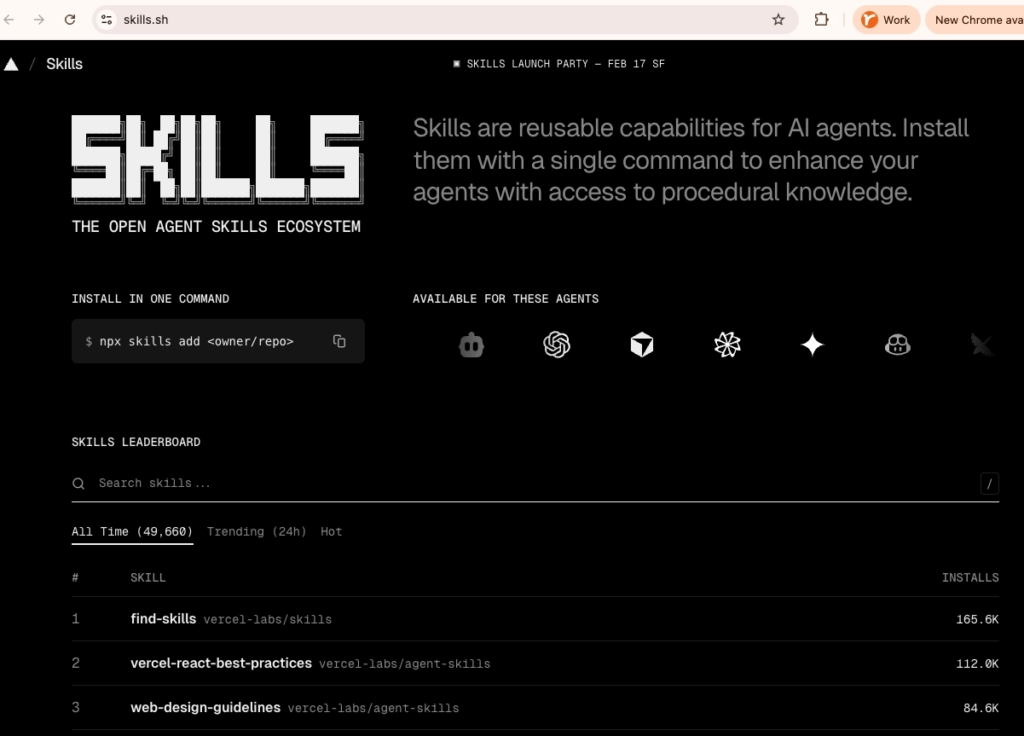
find-skills skill.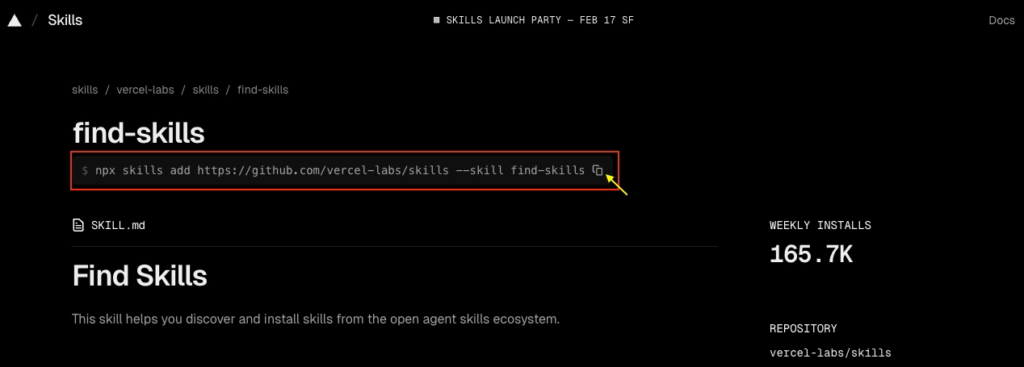
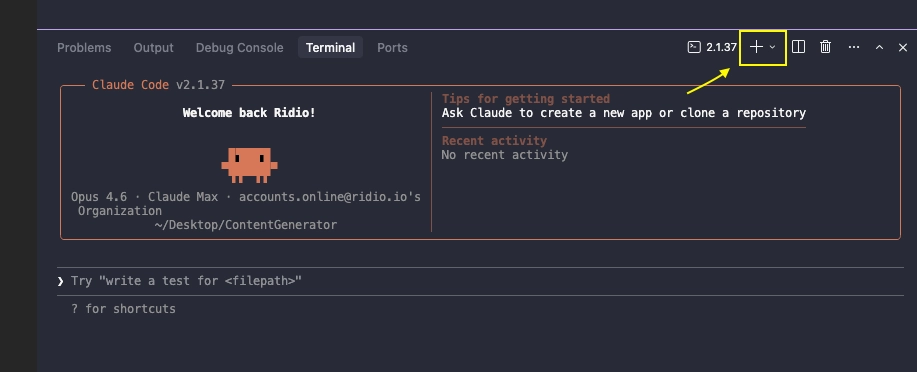

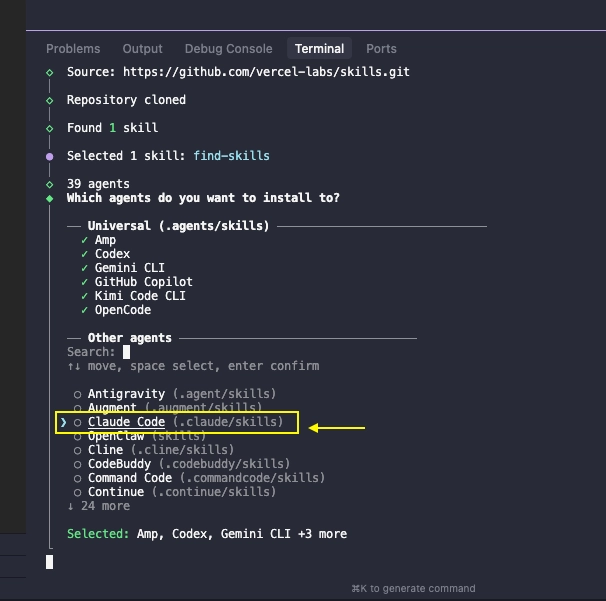
⚠️ Note: You can install it for ‘Global’ BUT not recommended, because the skill gets installed only on this computer. When we try to load this project on another computer, we won’t have access to this skill.
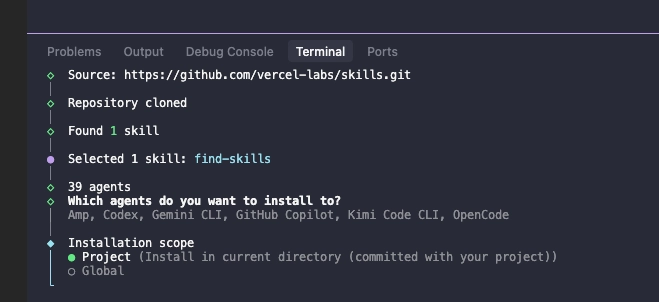
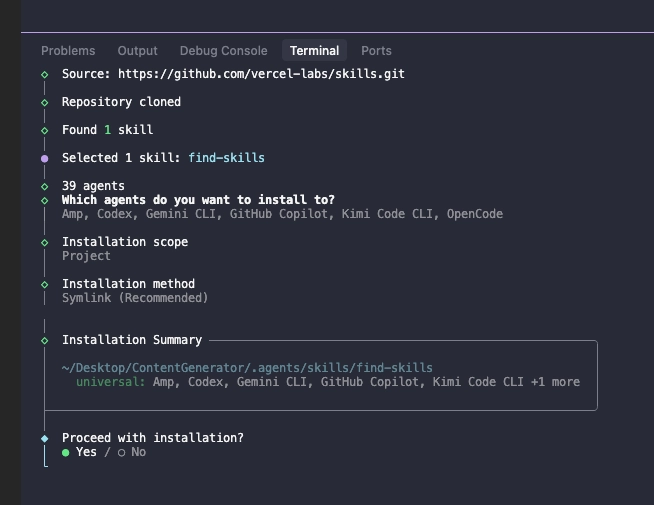
/skills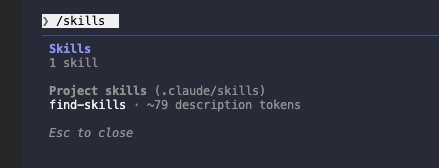
/find-skills or simply type: find skills. If we don’t specify, Claude will automatically use it when it thinks it’s necessary. (But it’s good to tell Claude to use a skill explicitly)In this post, I’ve installed skills focused on content generation and research for content creation to automate and streamline my content-generating process. However, there are many more skills available for you to search for based on your own purpose and the workflow you want to streamline, so I hope this guide was useful for getting started with Claude skills.
| Skill | Purpose | Link |
|---|---|---|
| skill-creator | Helps create new custom skills ourselves | https://skills.sh/anthropics/skills/skill-creator |
| Searches Reddit posts, comments | https://skills.sh/resciencelab/opc-skills/reddit | |
| writing-linkedin-posts | Create engaging, authentic LinkedIn posts that drive meaningful engagement and establish thought leadership. | https://skills.sh/jamesgray007/hoai-course/writing-linkedin-posts |
| keyword-research | This skill helps you discover, analyse, and prioritise keywords for SEO and GEO content strategies. | https://skills.sh/aaron-he-zhu/seo-geo-claude-skills/keyword-research |
| researching-ai-news needs Perplexity MCP* | Research and compile AI news from across the industry, covering major companies and emerging trends. | https://skills.sh/jamesgray007/hoai-course/researching-ai-news |
| brand-storytelling | Help the user craft compelling narratives that make their brand memorable using techniques from 30 product leaders and storytelling experts. | https://skills.sh/refoundai/lenny-skills/brand-storytelling |
| social-content | You are an expert social media strategist. | https://skills.sh/coreyhaines31/marketingskills/social-content |
Now you know how to set up Claude Skills🎉.
In my next post, I will go through how to create your own personalised Claude skills.




Most people validate business ideas the wrong way. They ask friends, run a Twitter poll, or worse: just…
Discover the top Claude Code plugins to try, including useful tools for web data, automation, and extending your…
Learn how to build Claude Skills that actually work using clearer planning, stronger prompts, and a repeatable testing…







[…] Read the post here → How to setup Claude Skills […]
Wonderful… 👍
[…] we now know how to install a skill and how to create one as well. We’ve made our persona file and we gave plenty of resources, […]
[…] And if you’re new to Claude Code and not sure where to start, check out our previous post on Claude Skills 👉 How to setup Claude Skills […]
[…] 👉 How to setup Claude skills […]
[…] 👉 How to setup Claude Skills […]
[…] 👉 How to setup Claude Skills […]
[…] How to set up Claude skills […]
[…] 👉 How to setup Claude Skills […]
[…] 👉 How to setup Claude Skills […]